Most companies do not have an email problem. They have a webmail problem. The mailbox itself — the one that came with the domain from Hostinger, GoDaddy or Google — works fine. What hurts is the interface around it: a provider panel designed in another decade, no idea which message matters, no warning when a “supplier” asks to change bank details, and nothing that connects the mail you receive to the business you are trying to run.
So we built Lacspace Mail, and we built it with one rule: keep the mailbox you already have. Lacspace Mail signs in to your existing mailbox over IMAP and SMTP, keeps a searchable copy in sync, and adds the brain on top. Nothing is migrated. There are no provider panels. And if you ever leave, your mail is exactly where it was.
A calm inbox that sorts itself
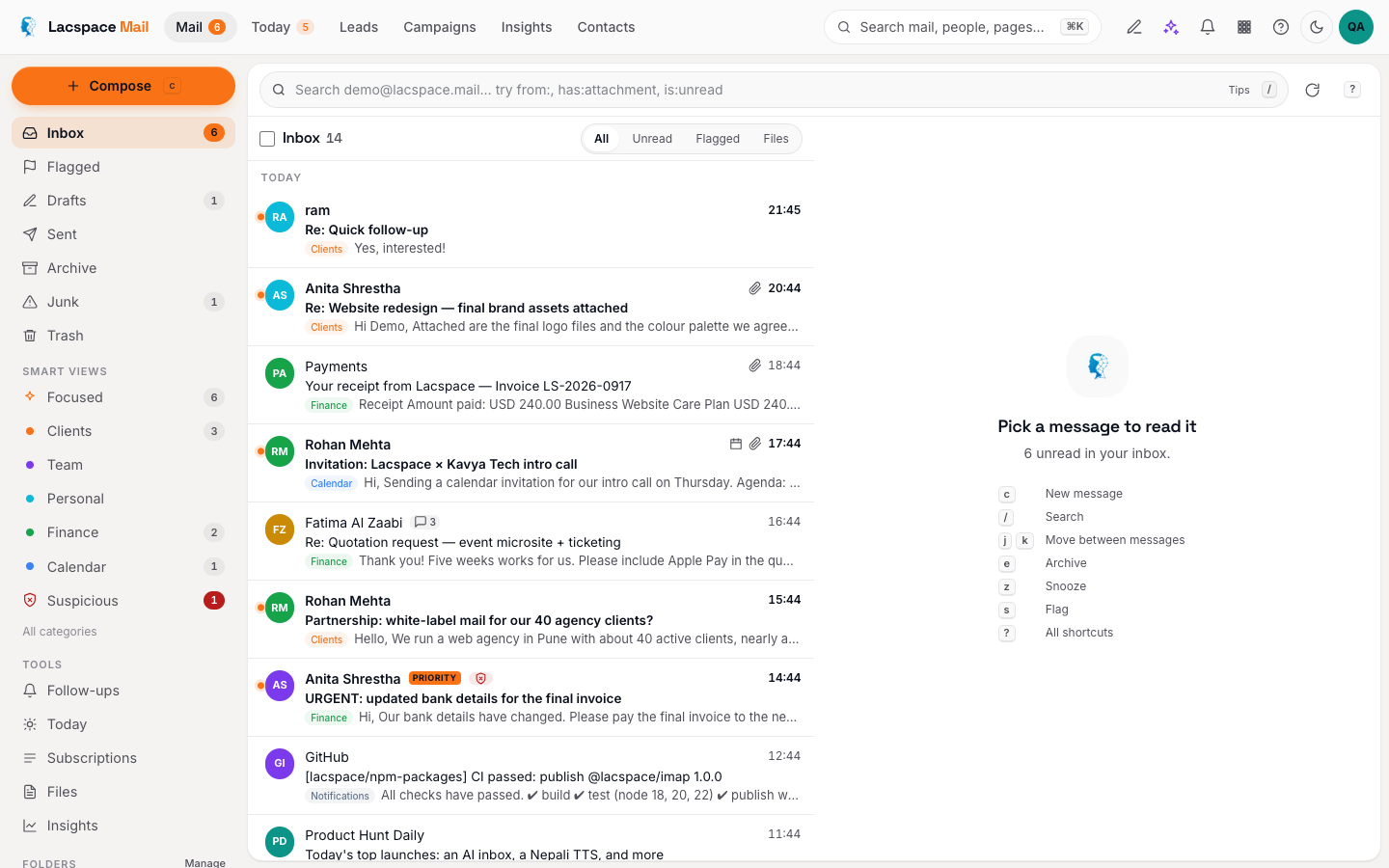
Every message is tagged as it lands — Team, Clients, Personal, Finance, Calendar, Recruiting, Newsletters, Notifications, Social, Promotions — and given a priority. Focused shows what needs a human; everything else is one tap away but no longer in your face. Correct a category once and the classifier learns that sender. Search understands operators like from:, has:attachment, after:7d and is:suspicious, and it is indexed the moment mail arrives, so results are instant.
Phishing checks on every message
Lacspace Mail reads the SPF, DKIM and DMARC verdicts on every message and adds plain-English warnings for the tricks people actually fall for: look-alike domains, a Reply-To that points somewhere else, display names that impersonate a colleague, urgent payment language, links whose text and destination disagree. A message that trips the checks gets a red banner that says why in one sentence, and remote images stay blocked. HTML is sanitised before it is rendered.
Let the server do the tidying
Automations run on the server as mail arrives — move, tag, categorise, flag, snooze, forward, auto-reply, call a signed webhook, or notify you — with a preview before you save and a log of every run. Snooze returns mail at the right time on every device. Follow-up reminders clear themselves the moment someone replies. Scheduled send and undo live on a 30-second scheduler. Out of office answers once per sender and never to automated mail, so it can never loop.
The inbox as the place the business runs
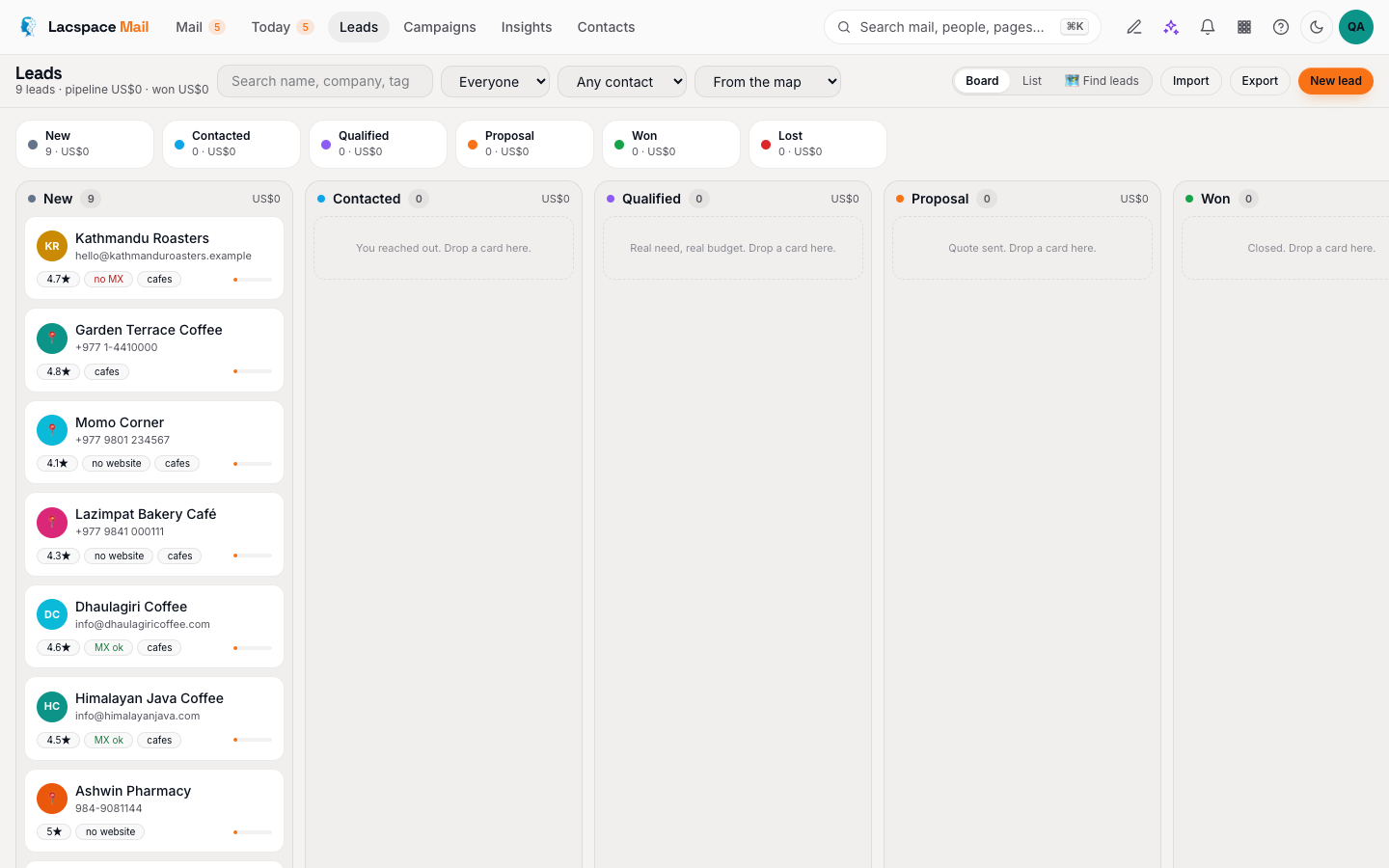
This is where Lacspace Mail goes further than a mail client. The Templates Studio builds branded emails from blocks with a deliverability score as you type. Campaigns send one message to many with per-recipient preview, A/B subjects, send windows, privacy-aware tracking and a suppression list that is honoured forever. Sequences send personal follow-ups from your own mailbox, threaded, that stop the moment they reply. Every reply can become a lead on a board next to the inbox — and the free Lead Finder fills that board with businesses straight from the map.
| What you keep | What Lacspace Mail adds |
|---|---|
| Your provider and your address | Smart categories, Focused view, instant search |
| Your mailbox password (encrypted, used only with the provider) | SPF/DKIM/DMARC verdicts and phishing warnings |
| Your Sent folder | Sequences from your own mailbox that stop on reply |
| Your domain reputation | Campaigns on a platform sender with one-click unsubscribe |
| Your data, wherever it already lives | Leads board, Lead Finder, Lumi AI, Today briefing |
Lumi AI, where it helps
Lumi summarises long threads, lists action items, drafts replies in a chosen tone, translates, rewrites four ways, and reviews a draft before you send it — tone, the attachment you mentioned but forgot, unclear asks. Lumi only ever sees the text you are looking at, never your whole mailbox or your credentials, and it never sends anything on its own. The basics work even without an AI key.
Built honestly
Everything above is documented — the mechanism, the best practice and the limits — at mail.lacspace.com/how-it-works. We would rather you read how the sausage is made than take a demo on faith. Mailbox passwords are encrypted at rest and only ever used to talk to your provider. Every public link — unsubscribe, tracking, lead-finder import — is a signed, scoped token. Nothing you receive can run code in your browser.
Open Lacspace Mail → Read how it works
Frequently asked questions
What is Lacspace Mail?
Lacspace Mail is business webmail that signs in to the mailbox you already have — over IMAP and SMTP — and adds a smart inbox, authentication and phishing checks, automations, scheduling, templates, campaigns, sequences, a leads board and Lumi AI on top. The mail stays with your provider.
Do I have to move my email to use it?
No. Nothing is migrated. You sign in with your existing address and mailbox password; Lacspace Mail keeps a searchable copy in sync and writes every change back to your provider. If you stop using it, your mail is exactly where it was.
Which providers does it work with?
Hostinger, Titan, GoDaddy, Google Workspace, Microsoft 365, Zoho, Yahoo, iCloud and any server that speaks IMAP and SMTP. Some Google and Microsoft tenants need an app password or IMAP enabled by the admin.
Is it an app?
It runs in the browser and installs as an app on desktop, Android and iOS, with push notifications for the mail you care about and an offline fallback.
How do we start?
Lacspace enables your company domain, then everyone signs in at mail.lacspace.com with their existing mailbox. Book a demo at lacspace.com and we set it up with you.