
In short
- eSewa ePay is a signed HTML form post followed by a signed, Base64-encoded redirect back to your site.
- Sign total_amount, transaction_uuid and product_code, in that order, with HMAC-SHA256 and Base64 output.
- Verify the response using the field list in signed_field_names, then check amount and product code against your own record.
- Call the status check API before fulfilling, and for any attempt that stays pending.
- Make completion atomic so a repeated redirect never fulfils an order twice.
eSewa ePay is a redirect-based payment flow. Your server signs a small set of form fields, the customer’s browser posts them to eSewa, the customer pays there, and eSewa sends the browser back to you with a signed result. The API surface is small. The work is in the verification: deciding when a payment is really paid.
This guide follows eSewa’s public ePay documentation and uses plain Node.js, with the built-in crypto module and fetch. The samples are generic. Credentials are read from environment variables and never appear in code. It also draws on what we learned running eSewa payments in production through Lacspace Payments, the shared payment layer behind several Lacspace-built products.
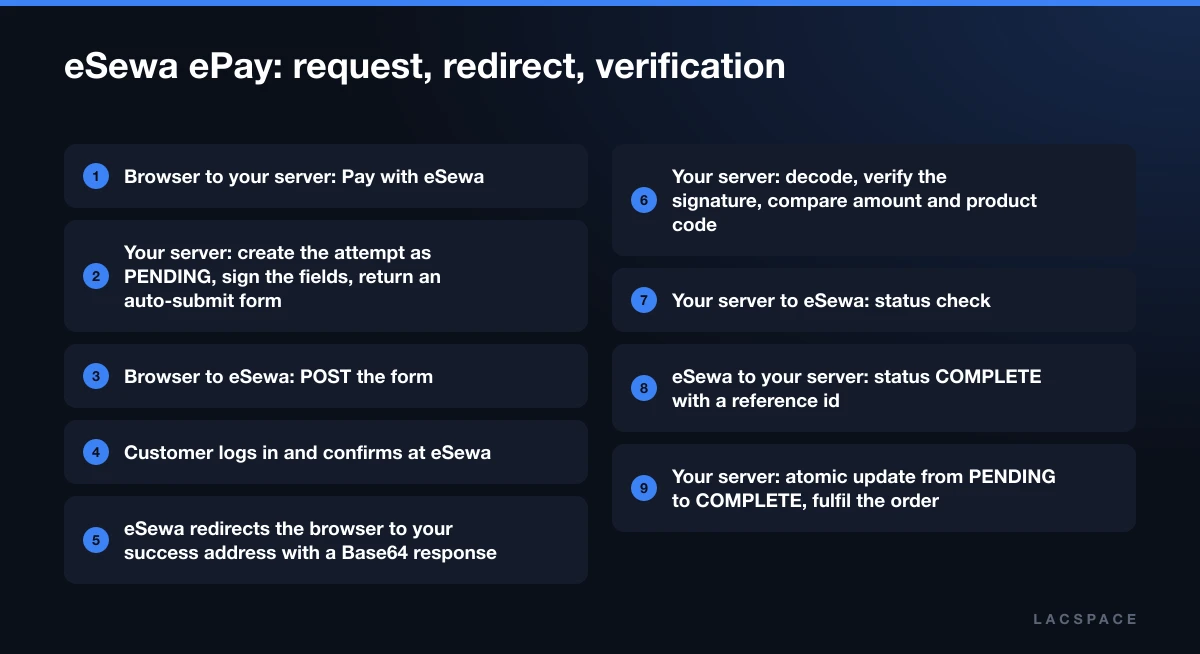
The flow in seven steps
- The customer clicks “Pay with eSewa”. Your server creates a payment attempt with status PENDING and a unique
transaction_uuid. - Your server signs three fields with HMAC-SHA256 and returns an HTML form.
- The browser posts the form to eSewa. The customer logs in and confirms.
- On success, eSewa redirects the browser to your
success_urlwith the response encoded in Base64. - Your server decodes the response and verifies its signature.
- Your server compares the amount and product code with its own record, then calls the status check API.
- Only if all of that agrees does the attempt become COMPLETE and the order get fulfilled.
If the customer cancels, or the payment fails, eSewa redirects to your failure_url instead. The documentation gives customers 15 minutes from login to complete a payment.
Endpoints and credentials
| Purpose | Test | Production |
|---|---|---|
| Payment form (POST) | https://rc-epay.esewa.com.np/api/epay/main/v2/form | https://epay.esewa.com.np/api/epay/main/v2/form |
| Status check (GET) | https://rc.esewa.com.np/api/epay/transaction/status/ | https://esewa.com.np/api/epay/transaction/status/ |
These are the addresses printed in eSewa’s documentation at the time of writing. Confirm the production status address with eSewa when you receive live credentials.
eSewa gives each merchant a product code and a secret key. For testing, the documentation publishes a test product code, EPAYTEST, together with a test secret key and test customer logins on its test credentials page. Live credentials are issued after successful test transactions.
Keep everything in environment variables:
// esewa.js
const crypto = require('node:crypto');
const config = {
formUrl: process.env.ESEWA_FORM_URL,
statusUrl: process.env.ESEWA_STATUS_URL,
productCode: process.env.ESEWA_PRODUCT_CODE,
secret: process.env.ESEWA_SECRET,
baseUrl: process.env.PUBLIC_BASE_URL,
};
function hmacBase64(message) {
return crypto
.createHmac('sha256', config.secret)
.update(message)
.digest('base64');
}
Generating the signature
The signature is an HMAC-SHA256 of one string, output as Base64. The documentation fixes both the fields and their order: total_amount, transaction_uuid, product_code. The string looks like this:
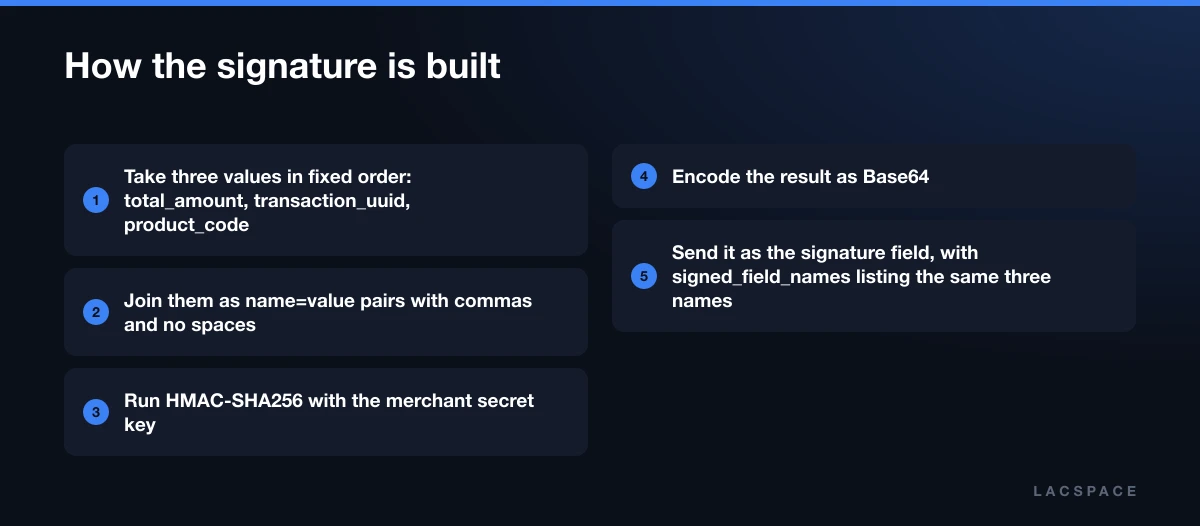
total_amount=110,transaction_uuid=ord-1042-a1,product_code=EPAYTESTThere are no spaces, and the values must be exactly the values you put in the form. If the form says 110 and you sign 110.00, the signature will not match.
Rules from the documentation that are easy to miss:
transaction_uuidmust be unique for every request and may contain only letters, digits and hyphens.total_amountmust equalamount + tax_amount + product_service_charge + product_delivery_charge.- Every field is required. If you do not use tax, service or delivery charges, send
0.
function buildPaymentFields(attempt) {
const totalAmount = String(attempt.totalAmount);
const message =
'total_amount=' + totalAmount +
',transaction_uuid=' + attempt.id +
',product_code=' + config.productCode;
return {
amount: String(attempt.amount),
tax_amount: String(attempt.taxAmount || 0),
total_amount: totalAmount,
transaction_uuid: attempt.id,
product_code: config.productCode,
product_service_charge: '0',
product_delivery_charge: '0',
success_url: config.baseUrl + '/pay/esewa/success',
failure_url: config.baseUrl + '/pay/esewa/failure',
signed_field_names: 'total_amount,transaction_uuid,product_code',
signature: hmacBase64(message),
};
}
Building the form POST
The request is an ordinary HTML form post from the customer’s browser, not a server-to-server call. The simplest approach is to return a page that submits itself. Build it on the server so the secret never reaches the browser.
function escapeHtml(value) {
return String(value)
.replace(/&/g, '&')
.replace(/"/g, '"')
.replace(/</g, '<');
}
function renderPaymentForm(fields) {
const inputs = Object.entries(fields)
.map(function (entry) {
return '<input type="hidden" name="' + entry[0] +
'" value="' + escapeHtml(entry[1]) + '">';
})
.join('');
return '<!doctype html><html><body>' +
'<form method="POST" action="' + config.formUrl + '">' + inputs +
'<noscript><button type="submit">Continue to eSewa</button></noscript>' +
'</form></body></html>';
}The documentation also allows up to three optional fields named properties[your_field_name]. Do not rely on them for anything you could store against the attempt in your own database.
Handling the success redirect
After a successful payment, the customer is redirected to your success_url with the response encoded in Base64. In our integration it arrives as a query parameter named data. Decoded, it is JSON with these fields: transaction_code, status, total_amount, transaction_uuid, product_code, signed_field_names and signature.
Two details matter:
- The response is signed over more fields than the request. Read the list from
signed_field_namesand build the string in that order. The list includessigned_field_namesitself. - The amount comes back formatted. The documentation’s example shows
"1,000.0". Sign the value exactly as received, but strip the comma and compare numerically when you check it against your record.
const MUST_BE_SIGNED = ['status', 'total_amount', 'transaction_uuid', 'product_code'];
function decodeResponse(encoded) {
return JSON.parse(Buffer.from(encoded, 'base64').toString('utf8'));
}
function verifyResponse(data) {
const names = String(data.signed_field_names || '').split(',');
const covered = MUST_BE_SIGNED.every(function (n) { return names.includes(n); });
if (!data.signature || !covered) return false;
const message = names.map(function (n) { return n + '=' + data[n]; }).join(',');
const expected = Buffer.from(hmacBase64(message));
const received = Buffer.from(String(data.signature));
return expected.length === received.length &&
crypto.timingSafeEqual(expected, received);
}
function toPaisa(value) {
return Math.round(Number(String(value).replace(/,/g, '')) * 100);
}
The check on MUST_BE_SIGNED makes sure the fields you are about to trust are covered by the signature. The comparison uses timingSafeEqual so the check does not leak timing information.
Verifying with the status check
A valid signature proves the message came from someone holding your secret and was not altered. It does not prove the message belongs to this order. Bind it to your own record, then ask eSewa directly.
async function checkStatus(attempt) {
const url = new URL(config.statusUrl);
url.searchParams.set('product_code', config.productCode);
url.searchParams.set('total_amount', String(attempt.totalAmount));
url.searchParams.set('transaction_uuid', attempt.id);
const res = await fetch(url, { signal: AbortSignal.timeout(15000) });
if (!res.ok) throw new Error('eSewa status check failed: ' + res.status);
return res.json(); // { product_code, transaction_uuid, total_amount, status, ref_id }
}
The documented statuses are:
| Status | Meaning in the documentation | What to do |
|---|---|---|
| COMPLETE | Successful payment | Fulfil the order |
| PENDING | Initiated but not completed yet | Wait and check again |
| NOT_FOUND | Payment terminated at eSewa: session expired | Treat as expired once the session window has passed |
| CANCELED | Canceled or reversed from eSewa’s side | Mark failed |
| AMBIGUOUS | Payment is in a halt state | Hold the order and contact eSewa |
| FULL_REFUND / PARTIAL_REFUND | Refunded to the customer | Record the refund |
Putting the checks together:
async function handleSuccess(encoded, store) {
const data = decodeResponse(encoded);
if (!verifyResponse(data)) return { paid: false, reason: 'bad_signature' };
const attempt = await store.findAttempt(data.transaction_uuid);
if (!attempt) return { paid: false, reason: 'unknown_transaction' };
if (attempt.status === 'COMPLETE') return { paid: true, attempt: attempt };
const sameProduct = data.product_code === config.productCode;
const sameAmount = toPaisa(data.total_amount) === toPaisa(attempt.totalAmount);
if (!sameProduct || !sameAmount) return { paid: false, reason: 'mismatch' };
const check = await checkStatus(attempt);
if (check.status !== 'COMPLETE') return { paid: false, reason: check.status };
// Atomic: only one request can move PENDING to COMPLETE.
const changed = await store.completeIfPending(attempt.id, check.ref_id);
if (changed) await store.fulfilOrder(attempt.orderId);
return { paid: true, attempt: attempt };
}
The documentation says the status check can be used when no response arrives within five minutes. We call it on every success redirect as well, and from a scheduled job for attempts that stay PENDING, because a customer can pay and then close the tab before the redirect happens.
Handling the failure redirect
The documentation describes failure_url as the address for a failed or pending transaction, and does not document a response body for it. So do not expect signed data there, and do not mark the attempt as failed just because the page was opened. Anyone can open that address.
- Find the attempt from your own session, or include your attempt reference in the
failure_urlyou send. We add it as a query parameter. - Run the status check before you change anything. If it returns COMPLETE, the payment succeeded.
- Show the customer a clear “payment not completed” page with a way to try again.
Idempotency
Redirects get repeated. Customers refresh, press back, and double-click. Design for it.
- Separate orders from attempts. One order can have several payment attempts. Each attempt gets its own
transaction_uuid. - Never charge a paid order twice. Before creating a new attempt, check whether the order already has a COMPLETE attempt.
- Make completion atomic. Change status with a conditional update, “set COMPLETE where status is PENDING”, and fulfil the order only if that update changed a row.
- Return the same result on repeat. If the attempt is already COMPLETE, show the success page again without fulfilling again.
Common errors
| Symptom | Usual cause |
|---|---|
| eSewa rejects the form with a signature error | Fields signed in the wrong order, spaces in the string, a different total_amount in the form and the signature, or the test secret used with a live product code |
| Your own verification fails on success | You rebuilt the string from the request’s three fields instead of the response’s signed_field_names |
| Amount check fails on large payments | Comparing "1,000.0" as a string with 1000 |
| Status check returns NOT_FOUND right after you create the attempt | In our experience, eSewa only knows the transaction once the customer has submitted the form |
| Request rejected for the transaction ID | Characters other than letters, digits and hyphens, or a reused ID |
| Customer sees “Your booking has expired” | The eSewa session timed out. Create a new attempt |
Go-live checklist
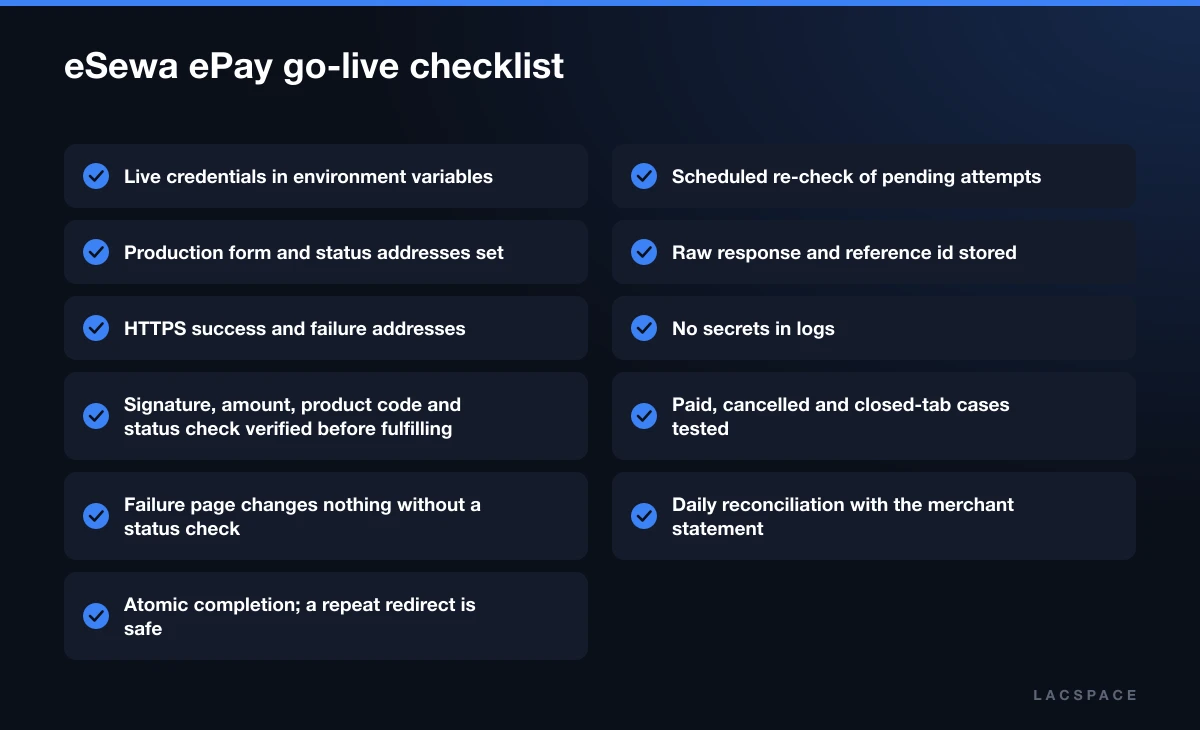
- Live product code and secret are stored in environment variables or a secret manager, not in the repository.
- Form and status addresses switch with the environment. No test address is left in production.
- Success and failure addresses are HTTPS and publicly reachable.
- The success handler verifies the signature, the amount, the product code and the status check before fulfilling.
- The failure handler changes nothing without a status check.
- Completion is atomic, and repeating the redirect does not fulfil twice.
- A scheduled job re-checks PENDING attempts and expires old ones.
- The raw decoded response and the
ref_idare stored for support and reconciliation. - Logs never contain the secret.
- A full test payment, a cancelled payment and a closed-tab payment have each been run end to end.
- Someone compares your COMPLETE attempts with the eSewa merchant statement every day.
Where this fits
eSewa’s documentation now also describes an app-based Intent flow and marks it as recommended. The form flow covered here remains documented. Read both before you start a new build.
If you are still choosing a provider, see eSewa vs Khalti vs Fonepay vs connectIPS for merchants and how to accept online payments in Nepal. For how a shared payment layer works across products, the iSmartExams case study describes Lacspace Payments in use.
eSewa can change its API. Treat its documentation as the authority, and test against its test environment before every release.
This guide describes a public integration flow in general terms. Field names, endpoints and test values are set by the payment provider and can change; check the provider's current developer documentation before going live.
Frequently asked questions
How do I generate the eSewa ePay signature in Node.js?
Build the string total_amount=VALUE,transaction_uuid=VALUE,product_code=VALUE with no spaces, then compute an HMAC-SHA256 of it with your secret key using the crypto module and output it as Base64. The values must match the form fields exactly.
How do I verify an eSewa payment response?
Decode the Base64 response to JSON, rebuild the signed string from the fields listed in signed_field_names in that order, and compare your HMAC-SHA256 with the signature provided. Then confirm the amount and product code against your own record and call the status check API.
What is the eSewa transaction status check API?
It is a GET request that takes product_code, total_amount and transaction_uuid and returns the transaction status with a reference ID. Documented statuses include COMPLETE, PENDING, NOT_FOUND, CANCELED, AMBIGUOUS, FULL_REFUND and PARTIAL_REFUND.
What are the eSewa test credentials for development?
eSewa publishes a test product code, EPAYTEST, with a test secret key and test customer logins on the test credentials page of its developer documentation. They are for the test environment only; live credentials are issued by eSewa.
Why does eSewa show an invalid signature error?
The usual causes are signing the fields in the wrong order, adding spaces, signing a total_amount that differs from the form value, or using the test secret key with a live product code.
How long does a customer have to complete an eSewa payment?
eSewa’s documentation says the payment fails if it is not made within 15 minutes of login, and the customer must start again. Create a new payment attempt with a new transaction_uuid in that case.