
In short
- Customers in Nepal pay online in four ways: wallets, Fonepay QR, connectIPS and cards through a bank gateway.
- Expect to show business registration, a PAN/VAT certificate, a recent tax clearance and proof of who can sign.
- Wallet payments land in a merchant wallet first; Fonepay and connectIPS pay into your bank account.
- Only some fees are published. Where they are not, ask the provider for the rate in writing.
- Record the payment method and reference on every bill, and reconcile every day.
A customer in Nepal who wants to pay you without cash will reach for one of four things: a wallet app, a QR code, a bank account, or a card. Each one is run by a different kind of company, pays you in a different way, and asks for different paperwork. This guide explains the four options in plain terms, what you need to apply, how the money reaches you, and how to pick.
We have kept to what the providers and regulators publish themselves. Where a provider does not publish a fee, we say so and tell you who to ask.
The four ways customers pay online in Nepal
| Option | How the customer pays | Where your money lands | Who you apply to |
|---|---|---|---|
| Wallets (eSewa, Khalti) | Logs in to the wallet and confirms the payment | Your merchant account with the wallet, then your bank | The wallet company |
| Fonepay QR | Scans your QR code with a banking or wallet app | Your bank account | A Fonepay-supported bank, or Fonepay’s enrollment form |
| connectIPS | Pays from a bank account linked to connectIPS | Your bank account | Your bank, which registers you with NCHL |
| Cards through a bank gateway | Enters Visa or Mastercard details on a secure page | As set in your agreement with the bank | A bank that offers an e-commerce gateway |
Wallets: eSewa and Khalti
A wallet payment starts on your website or app. The customer picks the wallet, is sent to the wallet’s own page, logs in and confirms. eSewa’s developer documentation describes exactly this flow for its ePay service: the customer is redirected to eSewa, confirms the transaction, and is sent back to your success or failure page.
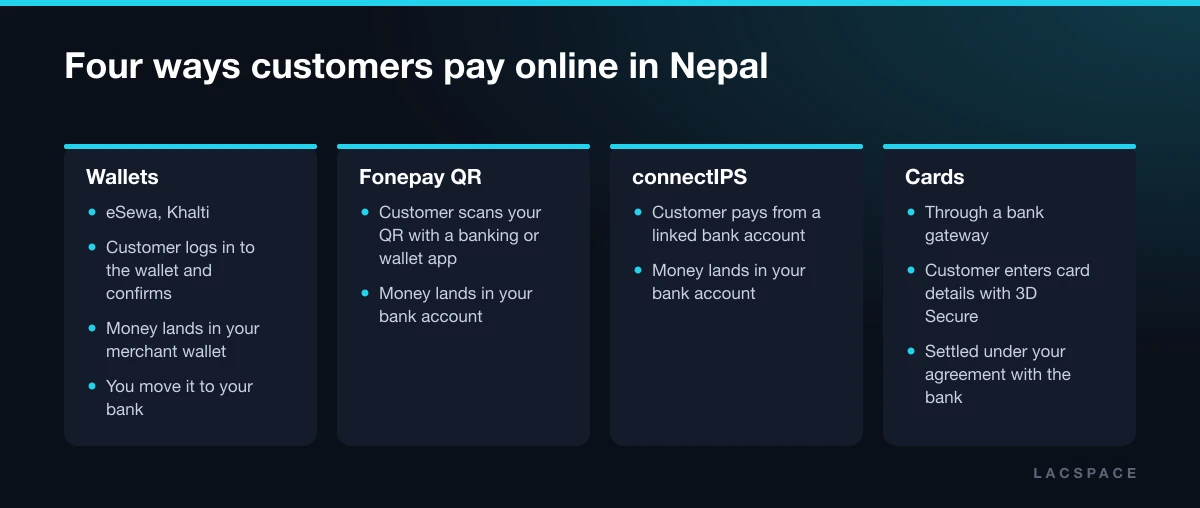
Khalti’s payment gateway works the same way, and its page lists more than the wallet balance: customers can also pay through e-banking, mobile banking, connectIPS and SCT cards on the Khalti checkout. Khalti is operated by IME Khalti Ltd.
Both companies offer plugins and SDKs as well as an API, so a small online shop does not always need a developer to start. If you do have a developer, our eSewa ePay integration guide for Node.js walks through the code.
Fonepay QR
Fonepay is a payment network. Its operator, Fonepay Payment Service Limited, states on its site that it is licensed by Nepal Rastra Bank as a payment system operator. You display a Fonepay QR code and the customer scans it with a participating app. Fonepay says payments are settled directly into your bank account. It suits a physical counter, and it also works for online orders if you can show a QR code at checkout. The guide to QR payments for shops covers static and dynamic codes in detail.
connectIPS
connectIPS is a product of Nepal Clearing House Ltd (NCHL). It lets customers link their bank accounts and pay directly from them. The site says merchants and billers can receive payments directly in their bank accounts. For a website, NCHL offers a gateway that your developer connects to. It suits larger bills, such as fees, invoices and bookings, where the customer is comfortable paying from a bank account.
Cards through a bank gateway
If you need to accept Visa or Mastercard, you work with a bank that offers a card gateway. Global IME Bank, for example, launched one with NCHL in May 2025 that accepts Visa and Mastercard issued by domestic and international banks and uses 3D Secure. Cards matter most when your buyers are abroad, or are tourists, because a foreign customer is unlikely to have a local wallet.
What you need before you apply
Every provider must know who it is paying. Nepal Rastra Bank’s NepalQR framework says the company that signs you up must carry out KYC and due diligence on every merchant, and must make sure the merchant is a registered entity under the law. So expect to prove three things: that the business exists, that it is registered for tax, and who is allowed to sign for it.
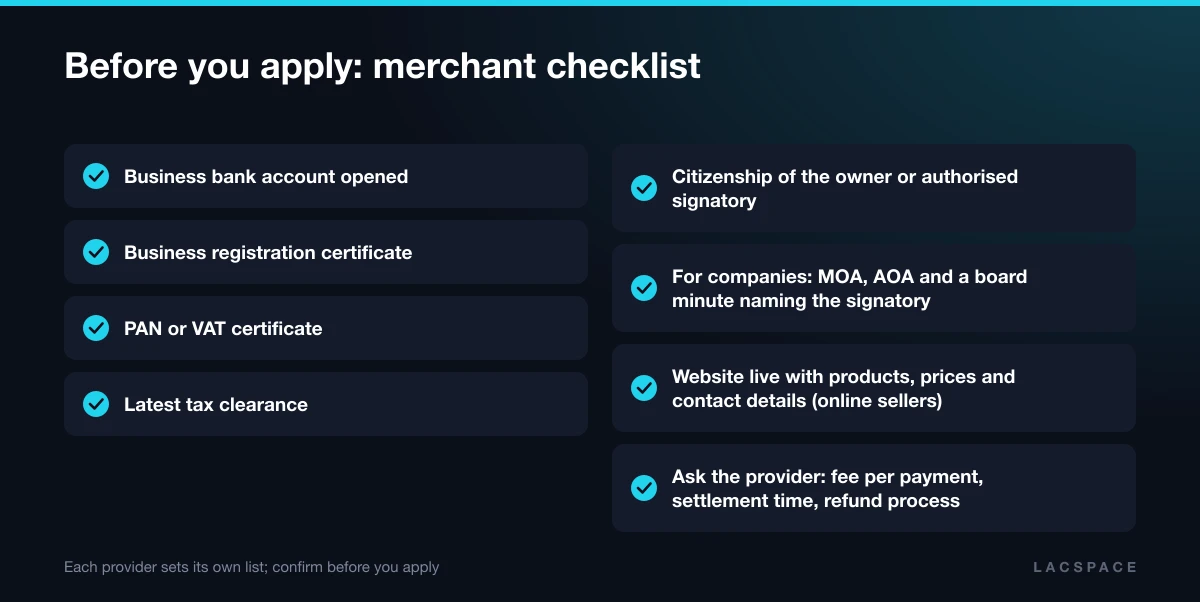
The lists below come from the providers’ own pages. They are a starting point. Each provider says it may ask for more.
| Provider | Documents it lists |
|---|---|
| eSewa (company) | Certificate of incorporation or industry registration, PAN/VAT certificate, MOA and AOA, board minute naming the signatory, citizenship of signatories, latest tax clearance, business licence if one applies, and a filled KYM form |
| eSewa (sole proprietor) | Business registration certificate, PAN/VAT certificate, proprietor’s citizenship and latest tax clearance. eSewa lists a lighter set for very small businesses |
| Khalti | Company registration certificate, PAN/VAT certificate, latest tax clearance and an updated logo. The business must be registered in Nepal |
| Fonepay | The online enrollment form asks for the owner’s name, citizenship number and contact details, the business name, location and type, PAN or non-PAN status, and the bank or wallet you want the QR issued by. The bank then applies its own checks |
| connectIPS | Your bank registers you. NCHL then issues a merchant ID and the credentials your developer needs |
| Card gateway | Set by the bank. Ask for its e-commerce merchant checklist |
Three practical points before you apply:
- Open a business bank account first. Every option ends in a bank account, and Fonepay’s form asks which bank or wallet should issue your QR.
- Keep your PAN or VAT certificate and latest tax clearance scanned and ready. Almost every list asks for them.
- If you sell online, have the website live. A provider will want to see what you sell, your prices and your contact details.
How and when the money reaches you
There are two patterns, and the difference matters for cash flow.
- Wallet first, bank second. With eSewa and Khalti, payments arrive in your merchant account with the wallet. You then move the balance to your bank. eSewa’s documentation says merchants can withdraw to their bank account free of cost. Khalti’s page says it does not charge to transfer funds to your bank account, and that withdrawals need a signed agreement.
- Straight to the bank. Fonepay and connectIPS both describe payments landing in the merchant’s bank account.
None of the pages we read promise an exact settlement hour, so ask each provider one direct question: “If a customer pays at 7 pm on Friday, when can I spend that money?” Write the answer down. It tells you how much working cash you need to hold.
What it costs
Fees are where guesswork causes the most harm, so here is only what is published.
- connectIPS. NCHL’s public fee schedule, effective 30 May 2025, lists creditor or merchant payments at Rs 2 for amounts up to Rs 500, Rs 4 for amounts above Rs 500 up to Rs 5,000, and Rs 8 above Rs 5,000. The schedule notes that charges can vary by arrangement with the member bank. Check NCHL’s schedule for the current version.
- Khalti. Its page says there is a one-time API charge plus a service charge on each transaction, and no annual maintenance fee. It does not publish the amounts. Ask Khalti.
- Fonepay. Its FAQ describes Fonepay Business QR as free for merchants and customers, and also says charges may apply to some payment types, such as credit card and cross-border payments. Confirm the terms with the bank that issues your QR.
- eSewa and bank card gateways. We found no published merchant rate. Ask for the rate in writing before you sign.
One rule applies to QR payments whoever you use. The NepalQR framework says no charge shall be levied on the customer for a QR payment unless Nepal Rastra Bank allows it, and that merchants should not recover the merchant fee from the customer. Do not add a “QR charge” to the bill.
How to choose
Start from your customer, not from the provider.
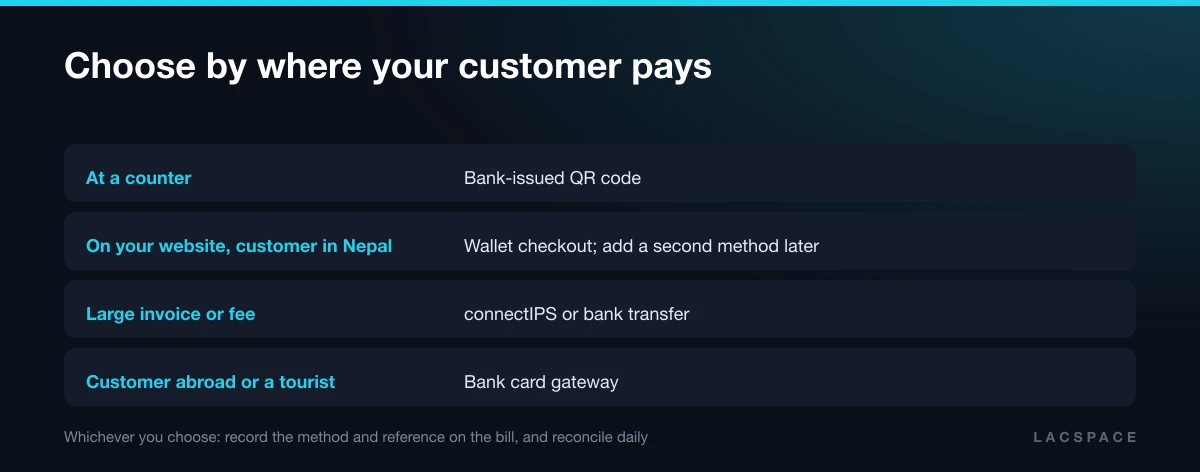
- You run a shop or restaurant counter. Start with a QR code from your bank. It needs no website and no developer.
- You sell online to customers in Nepal. Add a wallet checkout. Start with one wallet and add a second if customers ask for it.
- You send larger invoices. Offer connectIPS or a bank transfer, because the published per-payment fee is flat and small.
- You sell to tourists or customers abroad. You need a bank card gateway.
- You want one integration for several methods. Look at a checkout that bundles them. Khalti’s page, for example, lists wallet, bank and card options in one checkout.
Most businesses end up with two methods: one for the counter and one for the website. For a side-by-side view of the four providers, see eSewa vs Khalti vs Fonepay vs connectIPS for merchants.
Common mistakes
- Taking business payments on a personal wallet. It mixes your money with the shop’s and leaves no clean record. Apply as a merchant.
- Trusting a screenshot. A photo of a “payment successful” screen proves nothing. Wait for the notification in your own merchant app, SMS or dashboard.
- Shipping before the payment is verified. On a website, the customer returning to your “thank you” page is not proof. eSewa and Khalti both tell merchants to confirm the payment with a server-side check.
- Not recording which method was used. If the bill only says “paid”, you cannot match it to the bank or wallet statement later.
- Never reconciling. Compare your sales records with the provider’s statement every day. A gap found the same evening is easy to fix. A gap found at year end is not.
- Forgetting refunds. Decide how you will refund each method before the first customer asks.
Keep the payment and the bill together
Accepting payments is half the job. The other half is being able to say, for any rupee in your bank, which bill it paid. That is a bookkeeping habit more than a technology choice: one bill, one payment method, one reference number.
LSKhata, the billing, inventory and khata app from Lacspace, is built around that record. It creates invoices you can share as a PDF or over WhatsApp, tracks what each customer still owes, and its reports include a daily sales report and a payment collection report. Its site also lists QR payments and payment links among its features. Whatever tool you use, keep the bill and the payment in the same place.
This article is general information, not legal, tax or financial advice. Providers change their terms, so confirm documents, fees and settlement times with the provider before you apply.
This article is general information, not legal, tax or financial advice. Fees, limits and rules are set by each provider and regulator and change by notice; confirm the current terms with the provider, Nepal Rastra Bank or the Inland Revenue Department before you decide.
Frequently asked questions
How can I accept online payments in Nepal?
Apply as a merchant with a wallet such as eSewa or Khalti, get a Fonepay QR code through your bank, register for connectIPS through your bank, or ask a bank for a card payment gateway. Many businesses use one method at the counter and one on their website.
What documents do I need to open a merchant account in Nepal?
Providers commonly list a business registration certificate, a PAN/VAT certificate, the latest tax clearance and the citizenship of the owner or authorised signatory. Companies are usually also asked for the MOA and AOA and a board minute. Each provider can ask for more.
Which payment gateway is best for a small business in Nepal?
It depends on where your customers pay. A shop counter usually starts with a bank-issued QR code, an online shop with a wallet checkout, and a business selling to customers abroad needs a bank card gateway.
How much do payment gateways charge in Nepal?
NCHL publishes a connectIPS merchant payment fee of Rs 2, Rs 4 or Rs 8 depending on the amount, under its schedule effective 30 May 2025. Khalti says it charges a one-time API fee and a per-transaction service charge without publishing the amounts. For other providers, ask for the rate in writing.
Can I charge customers extra for paying by QR in Nepal?
No. Nepal Rastra Bank’s NepalQR framework says no charge shall be levied on the customer for a QR payment unless the central bank allows it, and merchants should not pass the merchant fee on to the customer.
Can I accept international card payments in Nepal?
Yes, through a bank that offers an e-commerce card gateway. Global IME Bank, for example, runs a gateway that accepts Visa and Mastercard issued abroad. Contact your bank for its merchant requirements and fees.