
In short
- Busy sessions concentrate load into a few minutes: everyone logs in, refreshes prices and checks balances at once.
- A broker does not control the exchange or a shared trading system, but it does control its own app, portal, data, logins and messages.
- Fetch market data once and serve everyone from that copy. Put slow work in a queue. Watch what clients feel, not only servers.
- In 2026, one vendor fault stopped 13 brokers and one data-centre attack stopped the whole market for a day. Plan for both.
The day a client most wants the app to work is the day it is most likely to struggle. Prices are moving, everyone opens the app in the same few minutes, and every screen asks for fresh numbers. A system that feels quick on a quiet Tuesday can feel broken on a heavy one.
This article is for a broker's managing director or operations head. It explains in plain terms why broker apps slow down, which parts a broker controls and which it does not, and what to put in place before the next busy session. It is about the software around trading: the app, the portal, the ledgers and the messages. It does not describe how any exchange system works inside.
What heavy days have looked like in Nepal
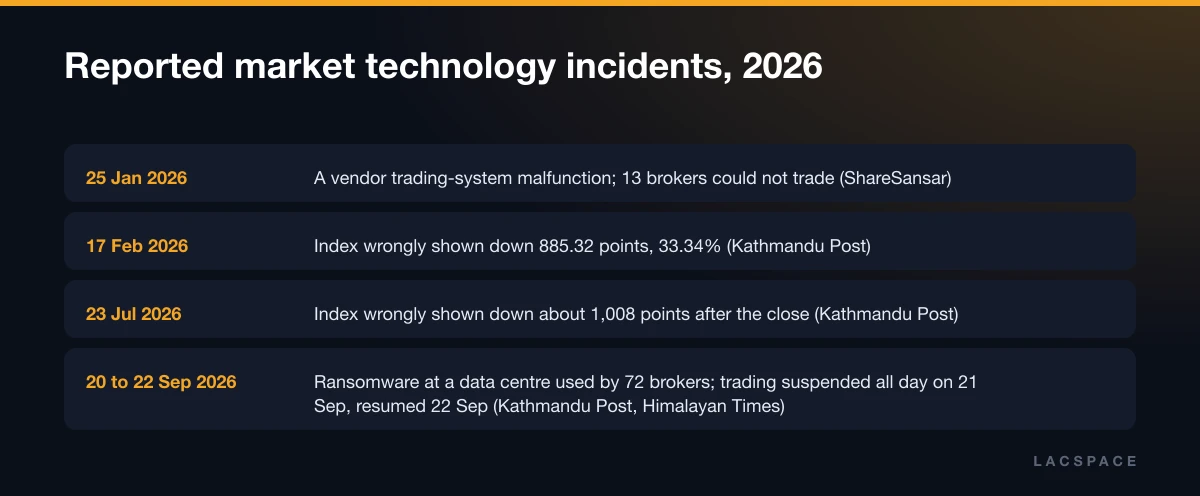
Nepal's market has had several public technology failures in 2026. They are the best argument for preparing, so it is worth being exact about what was reported.
| Date | What was reported | Source |
|---|---|---|
| 25 January 2026 | A malfunction in one vendor's trading system blocked 13 brokers from trading. The NEPSE index rose 2.12% that day on turnover of Rs 13.78 arba. | ShareSansar |
| 17 February 2026 | The index was displayed as falling 885.32 points, or 33.34%, because some closing prices showed as zero. It was a technical error. | Kathmandu Post |
| 23 July 2026 | About 15 minutes after the close, the NEPSE website and trading system showed the index down about 1,008 points. It was a data error, not a real move. | Kathmandu Post |
| 20 to 22 September 2026 | A ransomware attack hit a data centre used by 72 brokers. NEPSE suspended trading for the whole of 21 September. Trading resumed on 22 September. | Kathmandu Post, Himalayan Times |
Three lessons follow. First, a fault at one shared supplier reaches many brokers at once. Second, wrong data can do as much damage to trust as no data. Third, in each case the client's first question went to the broker, whoever was at fault. The cause of the January fault was not reported, so nobody should read it as proof that load alone brings systems down. It does show what a failure on a rising day costs.
The regulators have responded. NEPSE's IT audit guidelines of March 2026 require every broker to have an independent IT audit at least every two years. The audit looks at trading-system latency, security and transaction logging, especially during peak hours, and at mobile apps, websites and the disaster recovery plan (ICT Frame). In August 2026 SEBON told NEPSE to audit and penetration-test its own trading system (ShareSansar).
Why apps slow down when the market is busy
The causes are ordinary. They are the same in a broker app as in a ticket-booking site on a festival morning.
- Everyone arrives together. Regular trading runs from 11:00 to 15:00 (Kathmandu Post). Logins bunch up just before the open and again when the market moves sharply.
- Every screen asks the same question. If each client's app fetches prices separately, ten thousand clients mean ten thousand requests for the same number.
- Heavy work runs at the wrong time. Statements, reports and bulk messages started during the session compete with clients for the same capacity.
- One slow part slows the rest. An SMS provider, a payment gateway or a data feed that responds slowly can hold up every screen that waits for it.
- Clients retry. When a screen hangs, people tap again. Each retry adds load at the worst moment.
- Bigger moves are now allowed. Since April 2026 a share may move 15% in a day, up from 10% (ShareSansar). Wider limits mean more alerts, more margin checks and more client attention on volatile days. See NEPSE's new trading rules for 2026.
What is in the broker's control, and what is not
Being honest about this line helps in two ways. It stops a broker promising what it cannot deliver, and it shows where preparation pays.
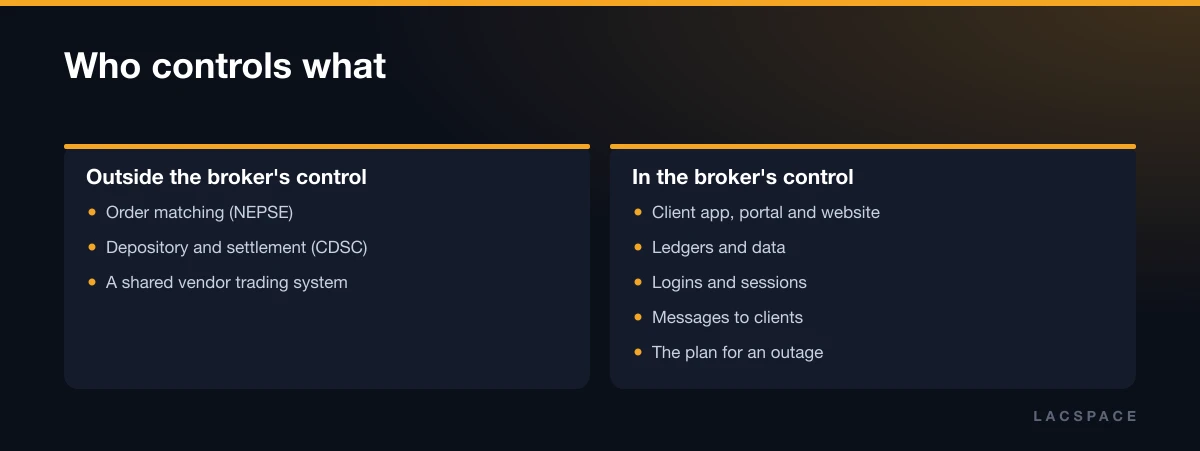
| Area | Who controls it | What the broker can still do |
|---|---|---|
| Order matching and the exchange's systems | NEPSE | Follow NEPSE notices; tell clients quickly when the exchange reports a problem |
| Depository, MeroShare and settlement systems | CDSC | Show settlement status from your own records; explain delays early |
| A shared trading system from a vendor | The vendor, under its agreement with the broker | Agree service commitments in writing; have a written plan for a vendor outage |
| An own trading system | The broker, with NEPSE approval | Staff it, test it under load and rehearse failover |
| Client app, portal and website | The broker | Cache, queue, monitor and release outside market hours |
| Ledgers, statements and client data | The broker | Back up off-site, test restores and keep an audit trail |
| Logins and sessions | The broker | Two-factor sign-in, sensible timeouts, alerts on new devices |
| Messages to clients | The broker | Status page, app banner and SMS, ready before they are needed |
Whether to run an own trading system at all is a separate decision. We cover it in what brokers need before applying for an own TMS.
Cache market data: fetch once, serve everyone
A cache is a recent copy kept close to the user. Instead of each client's app asking the original source for a price, the system fetches it once and gives every client that copy until the next update. A thousand visitors then cost little more than one.
Two rules keep caching honest. Show the time of the data on screen, so a client knows how fresh it is. And when a feed fails, show the last good value with its time or say the data is unavailable. Never fill a gap with a guess. The false index readings of February and July 2026 show what a wrong number on screen does to confidence.
Caching suits prices, charts, indices and news. It does not suit a client's own balance or order status, which must always come from the live record.
Queue the work that can wait
Not everything has to happen at the moment a client taps. A queue lets the system accept a request at once and do the slow part in order, in the background. Good candidates are contract notes, statements, bulk SMS and email, report exports and document checks during account opening.
A queue also protects the system from itself. If a messaging provider slows down, messages wait in line instead of freezing the app. The client sees a quick confirmation and the work completes a little later. What must never sit in a hidden queue is anything the client believes has already happened. Say "received, processing" when that is the truth.
Monitor what clients feel
Server dashboards can be green while clients are stuck. Measure the experience directly:
- How long sign-in takes, and how often it fails.
- How long the portfolio and ledger screens take to load.
- How old the market data on screen is.
- How many messages are waiting in each queue.
- Whether each outside service, such as SMS or payments, is answering.
Set an alert on each, sent to a named person during market hours. The test of monitoring is simple. Does your team learn about a problem from an alert, or from a client's phone call?
Tell clients early: status communication
In every 2026 incident, clients wanted one thing first: to know what was happening. A broker cannot fix an exchange or a data centre, but it can be the first to say something clear.
- Decide who declares an incident. One named person, with a backup.
- Prepare the messages now. A short template for "we are aware", "what you can and cannot do", and "resolved".
- Use channels that do not depend on the thing that is broken. A status page, an app banner, SMS and the website.
- Say whose system is affected, without blame. "The exchange has reported a problem" is information. Speculation is not.
- Close the loop. Afterwards, say what happened and what changes.
SEBON's August 2026 directives point the same way. They ask for push notifications to investors and for each broker to run a grievance unit that reports complaints monthly (ShareSansar). Clear messages during an incident reduce the complaints that unit has to handle.
Login security and session handling
Busy days are also when attackers try their luck, because a rushed client is less careful. Good security should not make sign-in slower for honest users.
- Two-factor sign-in. NEPSE's audit guidelines expect multi-factor authentication for staff logins (ICT Frame). Offer it to clients as well.
- Limit repeated attempts. Slow down or lock sign-in after several wrong passwords, and tell the client.
- Sensible sessions. End a session after a period of no activity. Ask for the password or a one-time code again before a payout request or a change of bank details.
- New-device alerts. Tell the client when their account is opened on a device not seen before.
- Staff access by role. The guidelines say no single employee should have excessive access, and duties should be separated.
- A record of everything. Every action should leave a permanent record that cannot be altered.
The same audit checks apps and websites for common weaknesses such as weak authentication. A security test before launch, and after each major release, finds these before an attacker does.
A readiness checklist for the next busy session
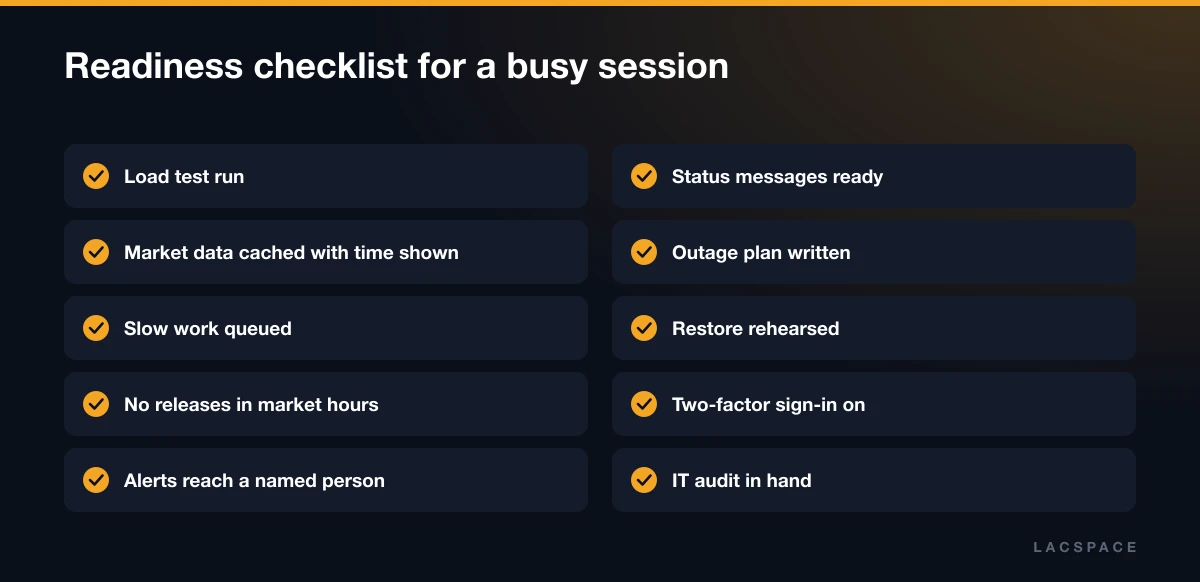
| Question | Ready when |
|---|---|
| Has the app been tested with many users at once? | A load test has been run and the result is written down |
| Is market data served from one shared copy? | Prices and charts are cached, with the data time shown |
| Does slow work run in the background? | Statements, bulk messages and reports are queued |
| Are releases kept out of market hours? | There is a written rule and it is followed |
| Do you see problems before clients call? | Alerts on sign-in, screen speed, data age and queues reach a named person |
| Can you tell clients within minutes? | Status page, app banner and SMS templates are ready and tested |
| Is there a written plan for a trading-system outage? | Roles, messages and reconciliation afterwards are agreed |
| Are backups off-site and tested? | A restore has been rehearsed, not only a backup taken |
| Is sign-in protected? | Two-factor sign-in, attempt limits and new-device alerts are on |
| Is the IT audit in hand? | An auditor is appointed and the last findings are closed |
For a wider self-check across client experience, onboarding, back office and resilience, LSNEP has a free digital readiness check for brokers. The answers stay in your browser.
Where LSNEP fits
LSNEP is the software around a broker's trading system: client app, portal, onboarding, back office, margin and support desk, in the brokerage's own name. It does not match orders, so it cannot prevent an exchange or trading-system outage. What it can do is keep the broker's own surfaces working and informative while one is under way: balances and ledgers from the broker's records, clear status messages, and support tickets with an owner. How LSNEP handles access, audit trails, monitoring and incidents is set out on the security and reliability page.
The habits in this article came from building market platforms that face the same daily surge. We describe them in what building market platforms taught us. The settlement side of a bad day is covered in our back-office guide.
LSNEP is software for licensed capital-market firms, built by Lacspace. It is not a broker, exchange, depository or investment adviser, and nothing in this article is investment advice. Regulatory details are summarised from public sources and change by notice; confirm current requirements with NEPSE, SEBON and CDSC.
Frequently asked questions
Why is my broker app slow when the market is busy?
Many clients log in and refresh prices in the same few minutes, so the system handles far more requests than on a quiet day. Slow outside services and repeated taps add to the load.
Is a TMS outage the broker's fault?
It depends on whose system failed. The exchange, a shared vendor, a data centre or the broker's own system can each be the cause. The broker is still responsible for telling its clients quickly and clearly.
What happened in the September 2026 NEPSE trading halt?
A ransomware attack hit a data centre used by 72 brokers. NEPSE suspended trading for the whole of 21 September 2026, and trading resumed on 22 September, as reported by the Kathmandu Post and the Himalayan Times.
How often must brokers in Nepal have an IT audit?
NEPSE guidelines reported in March 2026 require an independent IT audit at least once every two years, and within six months of licensing for new brokers.
How can a broker prepare its app for high-turnover days?
Serve market data from one cached copy, move slow work into background queues, test under load, keep releases out of market hours, monitor what clients experience and prepare status messages in advance.
Can LSNEP prevent a trading-system outage?
No. LSNEP does not match orders or replace the trading system. It keeps the broker's own app, portal, ledgers and client messages working around it.