
In short
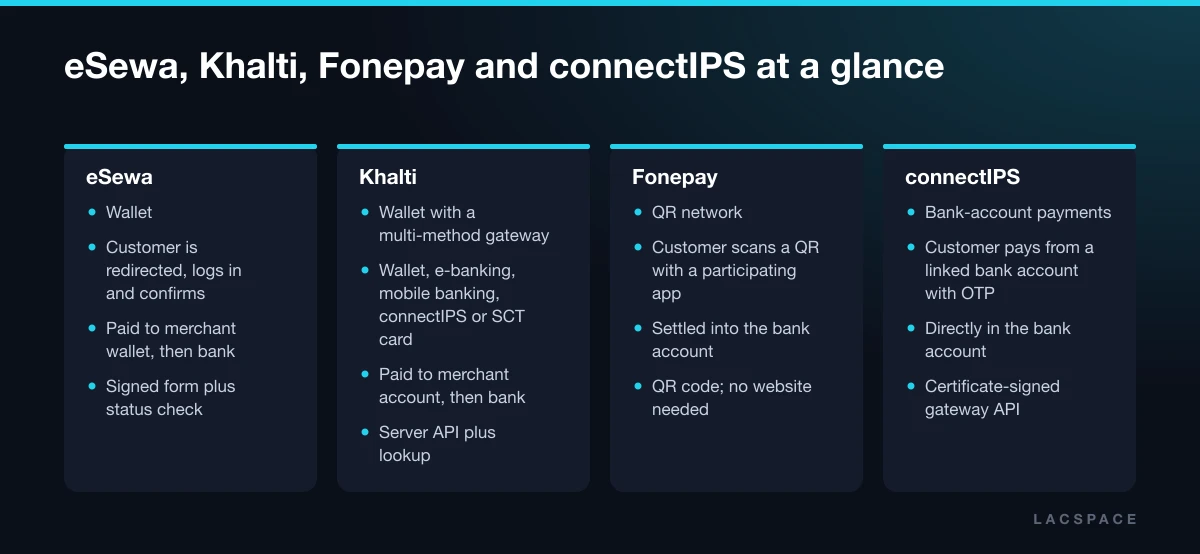
- eSewa and Khalti are wallets, Fonepay is a QR network that runs through banks, and connectIPS pays from bank accounts.
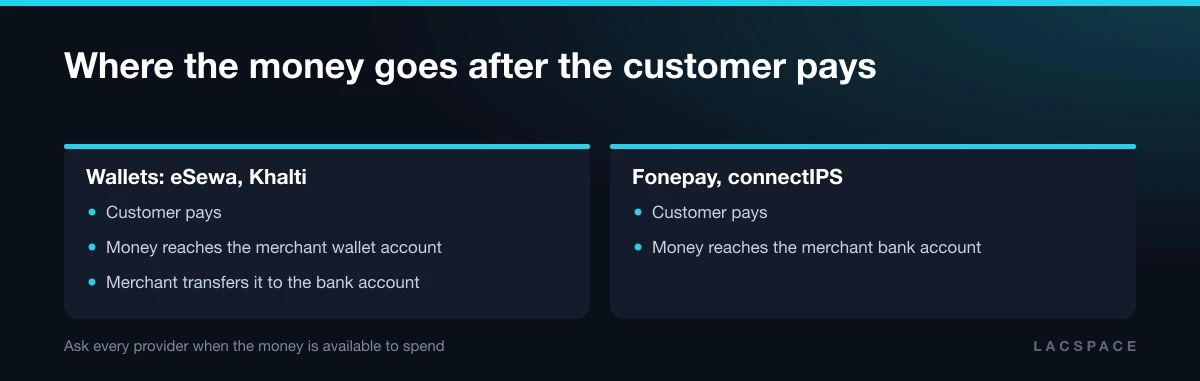
- Wallet payments reach a merchant wallet first; Fonepay and connectIPS pay into your bank account.
- Only NCHL publishes exact merchant fees, for connectIPS. For the others, ask for the rate in writing.
- There is no single best option. Choose by where your customers pay and how large your bills are.
eSewa, Khalti, Fonepay and connectIPS are often listed together as “payment options”, but they are not four versions of the same thing. Two are wallets, one is a QR and payment network that runs through banks, and one is a bank-account payment platform run by the national clearing house. That difference decides how your customer pays, where your money lands and how much work the setup is.
This comparison is for a business owner choosing what to offer. It sticks to what each provider publishes. We do not name a winner, because the right answer depends on your customers. Each section ends with “choose it if”.
The short comparison
| eSewa | Khalti | Fonepay | connectIPS | |
|---|---|---|---|---|
| What it is | Digital wallet with a merchant payment service (ePay) | Digital wallet with a payment gateway that bundles several methods | QR and payment network that works through banks and wallets | Platform for paying directly from linked bank accounts |
| Who runs it | eSewa | IME Khalti Ltd | Fonepay Payment Service Limited, an NRB-licensed payment system operator | Nepal Clearing House Ltd (NCHL) |
| How the customer pays | Is redirected to eSewa, logs in and confirms | On the Khalti checkout: wallet, e-banking, mobile banking, connectIPS or SCT card | Scans your QR code with a participating app | Logs in to connectIPS and approves with a one-time password |
| How you get paid | Into your eSewa merchant account, then withdrawn to your bank | Into your Khalti merchant account, then transferred to your bank | Settled into your bank account | Directly in your bank account |
| Integration | Signed form post and status check API; plugins for common shop platforms | Server API with a lookup check; web and mobile SDKs; plugins | A printed or on-screen QR code; no website needed | Gateway API signed with a certificate issued by NCHL |
| Published merchant fee | Not published. Ask eSewa | One-time API charge plus a per-transaction charge; amounts not published. Ask Khalti | Business QR described as free; charges may apply to some payment types. Confirm with your bank | Rs 2, Rs 4 or Rs 8 per payment by amount (NCHL schedule, 30 May 2025) |
| Often a fit for | Online checkout for wallet users | One checkout covering several methods | Shop and restaurant counters | Larger invoices and bank-to-bank payments |
Wallet, network or bank rail: why the type matters
Nepal Rastra Bank’s NepalQR framework uses three terms that help here. A payment system operator (PSO) runs a network that routes payments between its members. A payment service provider (PSP) is a licensed provider that serves customers and merchants; the framework also calls these e-money operators. An acquirer is the bank or PSP that signs up a merchant, keeps the merchant’s records and settles with the merchant.
So when you “join Fonepay”, the company that actually signs you up is a bank or wallet on the Fonepay network. When you join a wallet as a merchant, the wallet plays that role itself. This is why the paperwork, the fees and the support desk differ from one option to the next, even when the customer experience looks similar.
eSewa
eSewa’s merchant product for websites is called ePay. Its developer documentation describes the flow: the customer chooses eSewa on your site, is redirected to the eSewa login page, confirms the payment, and is sent back to your success page, or to your failure page if the payment fails or is cancelled. The customer must have an eSewa account.
Getting paid. Each merchant gets a merchant wallet. The documentation says the merchant account is credited for every successful transaction and that the merchant can withdraw the balance to a bank account free of cost.
Integration. ePay is a signed form post with a status check API. The documentation also lists plugins for WooCommerce, PrestaShop and Magento, and says SDKs are available for Android and iOS. Our eSewa ePay guide for Node.js shows the code.
Documents. eSewa publishes lists by business type. For a company: registration certificate, PAN/VAT certificate, MOA and AOA, a board minute, signatories’ citizenship, the latest tax clearance and a filled Know Your Merchant form.
Fees. We found no published merchant rate. Ask eSewa’s business team.
Choose eSewa if your customers already keep money in eSewa and you want a simple, well-documented checkout.
Khalti
Khalti is operated by IME Khalti Ltd. Its payment gateway is a single checkout that offers more than the Khalti wallet. The gateway page lists Khalti wallet, e-banking, mobile banking, connectIPS and SCT cards as ways the customer can pay.
Getting paid. Khalti’s page says payments are received in the Khalti merchant account first and then need to be transferred into your bank account. It says Khalti does not charge for that transfer, that there is no withdrawal limit, and that withdrawals require a signed agreement and your documents.
Integration. Your server asks Khalti to start a payment and receives a payment link. The customer pays on Khalti’s page and returns to your site. Khalti’s documentation then tells you to call its lookup API for the final validation, and to treat only the “Completed” status as success. Amounts are sent in paisa, and the minimum is Rs 10. There are web, Android and iOS SDKs and a WooCommerce plugin.
Documents. Company registration certificate, PAN/VAT certificate, latest tax clearance and an updated logo. The company must be registered in Nepal.
Fees. The page says there is a one-time API charge plus a service charge for each transaction, and no annual maintenance fee. It does not publish the amounts. Ask Khalti.
Choose Khalti if you want one integration that lets customers pay from a wallet, a bank or a card.
Fonepay
Fonepay is a network, not a wallet. Fonepay Payment Service Limited states on its site that it is licensed by Nepal Rastra Bank as a payment system operator. Customers do not hold a “Fonepay balance”. They scan a Fonepay QR code using an app that is part of the network, and the money moves from their account to yours.
Getting paid. Fonepay says payments are settled directly into your bank account. Its Fonepay Business app shows received and settled payments, lets you request payments and start refunds, and lets you download statements.
Integration. For a counter there is none: you display a QR code. Fonepay’s FAQ explains the two kinds. A static QR stays the same for the merchant. A dynamic QR is unique for every bill. The QR payments guide explains when each one helps.
Signing up. The FAQ says you can enrol by visiting a Fonepay-supported bank. There is also an online enrollment form that asks for the owner’s details, the business details, PAN or non-PAN status and the bank or wallet you want the QR issued by.
Fees. The FAQ describes Fonepay Business QR, static and dynamic, as free for merchants and customers. It also says charges may apply to certain payment types, such as Fonepay credit card and cross-border payments. Because your agreement is with the bank, confirm the terms there.
Visitors from India. The FAQ says Fonepay QR accepts UPI payments.
Choose Fonepay if customers pay you in person and you want the money in your bank account without building anything.
connectIPS
connectIPS is a product of Nepal Clearing House Ltd. Customers link their bank accounts to a connectIPS user and can then pay directly from those accounts on the web or in the app. The site says merchants and billers can receive payments directly in their bank accounts.
Getting paid. Bank account to bank account. There is no wallet balance in between.
Integration. NCHL’s gateway documentation says the merchant ID is issued by NCHL when your bank registers you. Your developer sends a payment request signed with a private key from a certificate that NCHL provides, using an RSA signature. You give NCHL a fixed success address and failure address in advance. After the customer approves the payment with a one-time password, they are sent back with only the transaction ID, and your server must call NCHL’s validation service to confirm the payment. It is more formal than a wallet integration.
Fees. NCHL publishes a schedule. Under the one effective 30 May 2025, a creditor or merchant payment costs Rs 2 for amounts up to Rs 500, Rs 4 above Rs 500 up to Rs 5,000, and Rs 8 above Rs 5,000. The schedule notes that charges may vary by arrangement with the member bank, so ask your bank who bears the fee. See NCHL’s fee schedule for the current version.
Choose connectIPS if your bills are large, your customers are comfortable paying from a bank account, and a flat fee per payment matters to you.
Questions to ask every provider
Whichever you lean towards, ask the same six questions and compare the answers on paper.
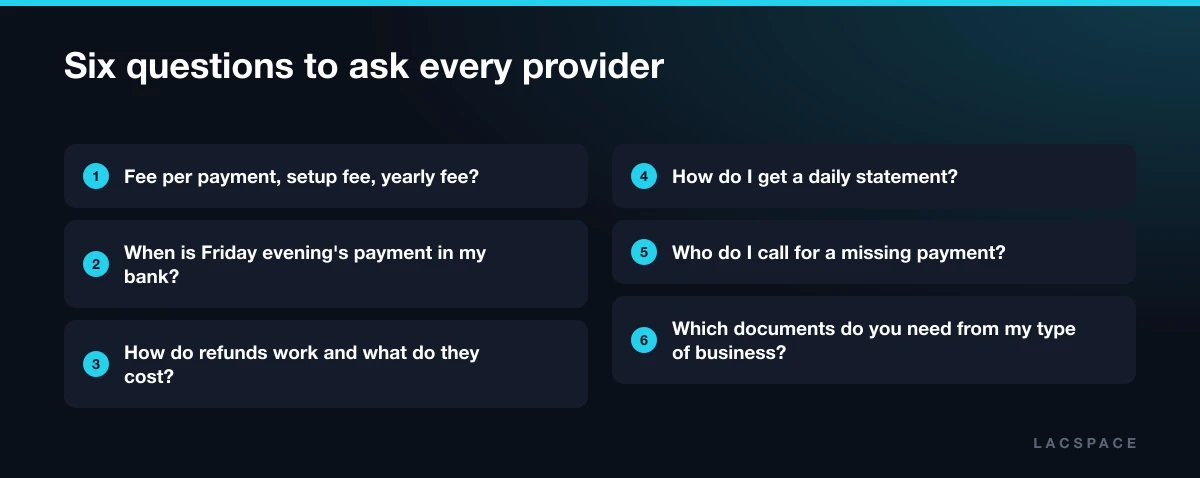
- What is the fee per payment, and is there a setup or yearly fee?
- If a customer pays on Friday evening, when is the money in my bank account?
- How do I refund a customer, and what does a refund cost me?
- How do I get a statement I can match against my bills each day?
- Who do I call when a customer says they paid but I see nothing?
- Which documents do you need from a business like mine?
You can offer more than one
These options are not exclusive. A shop might use a bank-issued QR code at the counter and a wallet checkout on its website. An institute might use connectIPS for fees and QR for small sales. Add a method only when you can also record and reconcile it. Every extra method is one more statement to check at day end.
That record-keeping is where a billing tool helps. LSKhata from Lacspace handles invoices, customer dues and stock, and its reports include a payment collection report you can compare with your statements. If you are starting from zero, read how to accept online payments in Nepal first.
This comparison is general information, not legal, tax or financial advice. Fees and terms change, so confirm them with each provider before you decide.
This article is general information, not legal, tax or financial advice. Fees, limits and rules are set by each provider and regulator and change by notice; confirm the current terms with the provider, Nepal Rastra Bank or the Inland Revenue Department before you decide.
Frequently asked questions
What is the difference between eSewa and Khalti for merchants?
Both are wallets with a merchant checkout, and both pay into a merchant account that you then move to your bank. eSewa’s ePay takes payment from eSewa accounts, while Khalti’s gateway page also lists e-banking, mobile banking, connectIPS and SCT cards on one checkout.
Is Fonepay a wallet like eSewa?
No. Fonepay is a payment network licensed by Nepal Rastra Bank as a payment system operator. Customers scan a Fonepay QR with a participating banking or wallet app, and Fonepay says payments are settled directly into the merchant’s bank account.
Which is cheaper for merchants: eSewa, Khalti, Fonepay or connectIPS?
Only connectIPS has an exact published merchant fee: Rs 2, Rs 4 or Rs 8 per payment depending on the amount, under NCHL’s schedule effective 30 May 2025. Fonepay describes its Business QR as free with exceptions, and eSewa and Khalti do not publish merchant rates, so ask each provider.
Can I use eSewa, Khalti and Fonepay together?
Yes. They are separate agreements and you can offer more than one, for example a QR code at the counter and a wallet checkout online. Add a method only if you can reconcile it daily.
How does connectIPS pay merchants?
connectIPS says merchants and billers receive payments directly in their bank accounts. The customer pays from a bank account linked to connectIPS, so there is no wallet balance in between.
Does Fonepay QR accept payments from Indian customers?
Fonepay’s FAQ says Fonepay QR accepts UPI payments, which it describes as convenient for Indian tourists. Fonepay also notes that charges may apply to cross-border payments, so confirm the terms with your bank.