
In short
- PAN identifies a taxpayer; VAT registration is separate, and only a registered business may show or collect VAT.
- The VAT Act sets a single rate of 13 percent and requires a registered seller to give an invoice in the prescribed format.
- A registered taxpayer files a return every month, within twenty-five days of the month end.
- IRD can order named taxpayers to bill electronically and connect to CBMS, and using software that lets data be deleted or altered carries a Rs 5 lakh fine.
- This is general information, not tax advice. Confirm thresholds and formats with IRD or your accountant.
A bill is the smallest tax document a business makes, and it makes dozens of them a day. If the bill is wrong, everything built on it is wrong: the sales book, the monthly VAT return and the buyer’s own tax credit. This guide explains, in plain terms, how VAT billing works in Nepal, what a correct invoice needs, and where billing software fits.
The rules below are taken from the Value Added Tax Act, 2052, as published by the Inland Revenue Department (IRD) with amendments up to the Finance Act, 2082. Where a detail sits in the VAT Rules or in an IRD notice that we could not read first-hand, we say so and point you to IRD.
PAN and VAT registration are not the same thing
Business owners often use “PAN bill” and “VAT bill” loosely. They are two different things.
- PAN is the Permanent Account Number that identifies you or your business to the tax office. Having a PAN does not, by itself, let you charge VAT.
- VAT registration is a separate registration under the VAT Act for a business that deals in taxable goods or services. The tax officer issues a registration certificate with a registration number.
The Act is strict about the line between the two. Section 15 says a person who is not registered must not issue any invoice or document showing tax collected, and must not collect the tax. If an unregistered person does collect it, the tax office can assess and recover that amount. So a business that only has a PAN issues a plain invoice with no VAT line.
A registered business has duties in return. Under section 10 it must display its registration certificate where customers can see it, at its main place of business and at each other location. It must use its registration number on its VAT, excise and customs dealings.
The rate, and who has to register
The rate. Section 7 of the Act sets a single VAT rate of 13 percent. Goods and services listed in Schedule 2 are taxed at zero percent. Goods and services listed in Schedule 1 are exempt.
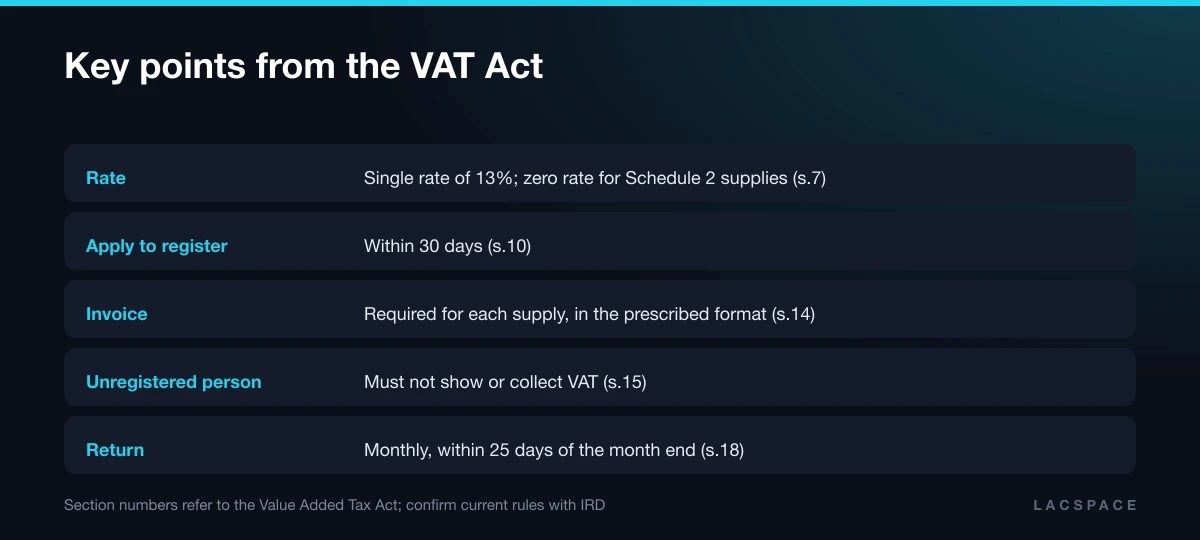
Who registers. Section 10 says a person whose goods or services are taxable must apply for registration within thirty days of the date the transaction became taxable or the business began. A person who deals only in the exempt items in Schedule 1 does not need to register.
Small businesses. Section 9 allows small businesses, up to a turnover amount set by the rules, to be excused from registering and filing. A small business can still choose to register voluntarily.
The turnover figures. The Act itself shows the figures in section 11, which lists when a registration can be cancelled. One ground is that taxable turnover over the past twelve months did not reach Rs 50 lakh for goods, or Rs 30 lakh for services and for mixed goods-and-services businesses. A footnote in IRD’s text records that the Finance Act, 2081 raised the second figure from Rs 20 lakh. These are the numbers usually quoted as the registration threshold. Older guides still show Rs 20 lakh, so confirm the figure that applies to your business with IRD or your accountant before you rely on it.
| Point | What the Act says | Section |
|---|---|---|
| Rate | Single rate of 13 percent; zero rate for Schedule 2 items | 7 |
| Apply to register | Within thirty days of the transaction becoming taxable | 10 |
| Exempt-only business | Need not register | 10 |
| Turnover figures | Rs 50 lakh for goods; Rs 30 lakh for services and mixed businesses, over twelve months | 11 |
| Invoice | A registered person must give one for each supply, in the prescribed format | 14 |
| Unregistered person | Must not show or collect VAT | 15 |
| Return | Monthly, within twenty-five days of the month end | 18 |
What the law says about invoices
Section 14 is short and worth knowing.
- Every registered person must give the buyer an invoice when supplying goods or services, except in situations the rules set out.
- The format of the invoice is prescribed. It is set in the VAT Rules, not left to the seller.
- Taking the invoice is the buyer’s duty too.
- Taxable goods worth more than Rs 10,000 that are transported outside the area IRD specifies must travel with the tax invoice.
Both sides can be fined. Under section 29, a registered person who does not give an invoice can be fined Rs 10,000 for each instance, and a buyer who does not take one can be fined Rs 1,000 for each instance.
What a correct tax invoice shows
The exact layout is fixed by a schedule to the VAT Rules, and IRD has revised the formats over time. The rules also provide a shorter invoice for retail sales in limited cases, with the tax officer’s permission. Check the current formats with IRD or your accountant. In practice, a tax invoice is expected to carry the following, and you should check each item against the prescribed format:
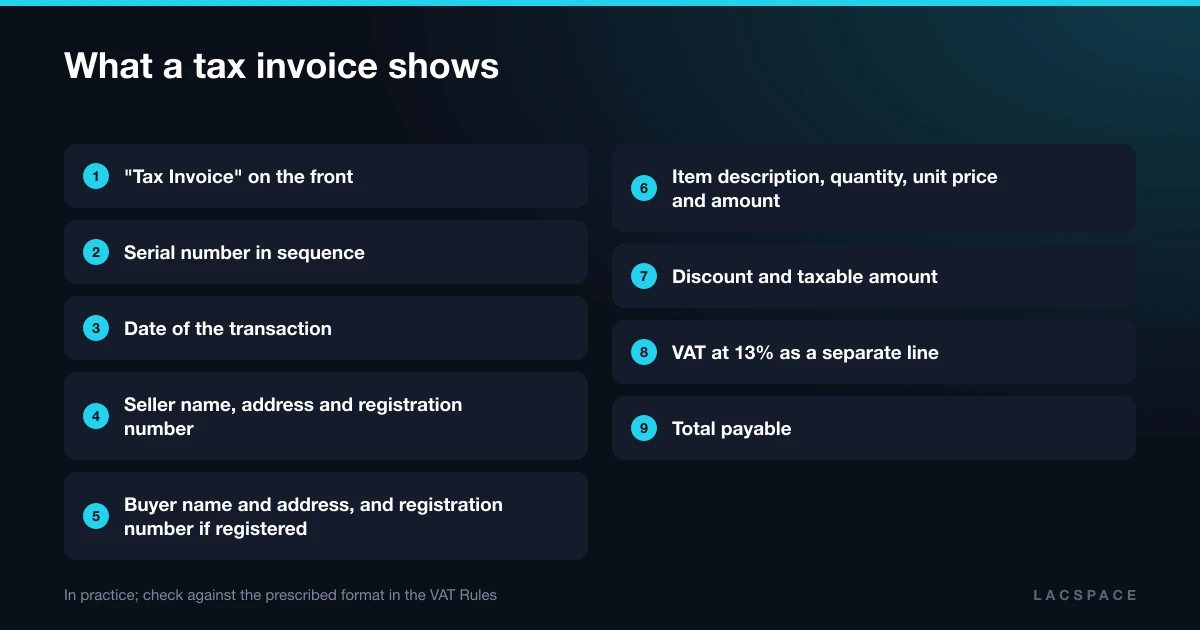
- The words “Tax Invoice”, clearly on the front.
- A serial number, in an unbroken sequence.
- The date of the transaction.
- The seller’s name, address and registration number.
- The buyer’s name and address, and the buyer’s registration number if the buyer is registered.
- For each item: description, quantity, unit price and amount.
- Any discount, and the taxable amount after discount.
- VAT at 13 percent, shown as a separate line.
- The total payable.
Several of these map directly to the Act’s record-keeping rule. Section 16 says a taxpayer’s accounts must include the date of each transaction, the value of each transaction, and the other party’s registration number if that party is registered. An invoice that carries those details makes the accounts almost write themselves.
Three mistakes come up again and again:
- Gaps in the numbering. A missing number looks like a missing sale. If a bill is spoiled, keep it and mark it cancelled.
- No buyer registration number. A registered buyer will want their number on your invoice for their own records and tax claims.
- VAT hidden in the price. If the tax is not shown as its own line, neither you nor the buyer can prove what was charged.
After the invoice: books and returns
The invoice is the first link in a chain.
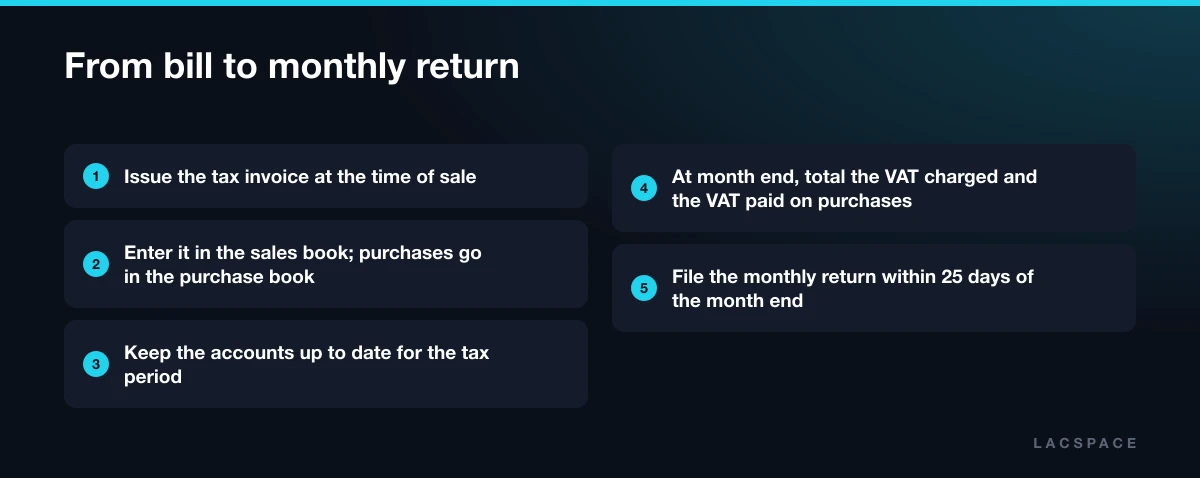
- Purchase and sales book. Section 16 requires a person dealing in taxable goods or services to keep a self-certified purchase and sales book for each fiscal year. A tax officer may inspect it at any time.
- Up-to-date accounts. Accounts must be kept current for each tax period and shown to the tax officer on request. They must be kept safely for the period the rules prescribe. Ask your accountant how long that is for your records.
- Monthly return. Section 18 requires a taxpayer to assess their own tax each month and file a return within twenty-five days of the end of the month. A return is due even for a month with no taxable transactions.
IRD’s rules on billing software and CBMS
The Act treats billing software as part of the tax system, not just a convenience. Section 14A sets out three things:
- A taxpayer may issue electronic invoices with IRD’s prior approval.
- IRD may, by public notice, order the taxpayers named in that notice to issue invoices electronically and to connect their system to IRD’s Central Billing Monitoring System (CBMS).
- IRD issues a procedure on the security and reliability of invoicing software and devices. Makers, distributors and users must all follow it.
The penalties are heavy. Under section 29, a taxpayer found using software that allows data to be deleted or corrected can be fined Rs 5 lakh. A person who makes, installs or operates invoicing software without following IRD’s procedure can also be fined Rs 5 lakh. Section 16 further allows IRD to obtain continuous access to a taxpayer’s computer database.
Which taxpayers must use electronic billing and connect to CBMS is set by IRD notice, and the turnover level has changed over time. We have not quoted a figure here because we could not confirm the current notice on IRD’s own site. If your turnover is large or growing fast, ask IRD or your accountant whether the notice covers you.
How software helps, and what to check before you buy
Even where electronic billing is not compulsory, software prevents the common errors. It numbers bills in sequence, calculates the tax the same way every time, stores a copy of every bill, and totals the month in seconds.
Questions to ask any vendor:
- Can a saved invoice be edited or deleted? Under the Act it should not be possible. Corrections should be made by a cancellation or return that leaves a trace.
- Does the invoice format match the current schedule in the VAT Rules?
- If I must use IRD-approved software or connect to CBMS, is this product approved and connected? Ask for proof, and check it with IRD.
- Can I export a sales and purchase register for my accountant?
- Does it keep working when the internet drops?
Where does LSKhata fit? LSKhata is the billing, inventory and khata app from Lacspace. Its site describes VAT-compliant invoice formats for Nepal, tax reports and an export for audits, and its published features include PDF invoices, thermal printing, offline billing and reports in PDF and CSV. Two things to be clear about. LSKhata does not file your taxes: its product page says what you file, and when, stays with you and your accountant. And we make no claim here that LSKhata is on IRD’s approved software list or connected to CBMS. If the law requires that for your business, confirm it before you rely on any billing tool, including ours.
For the payment side of the bill, see QR payments for shops and how to accept online payments in Nepal.
This article is general information, not tax or legal advice. Tax law changes with each Finance Act and IRD notice, so confirm rates, thresholds, invoice formats and deadlines with the Inland Revenue Department or a qualified accountant.
This article is general information, not legal, tax or financial advice. Fees, limits and rules are set by each provider and regulator and change by notice; confirm the current terms with the provider, Nepal Rastra Bank or the Inland Revenue Department before you decide.
Frequently asked questions
What is the VAT rate in Nepal?
Section 7 of the Value Added Tax Act, 2052 sets a single rate of 13 percent. Items listed in Schedule 2 of the Act are taxed at zero percent, and items in Schedule 1 are exempt.
What is the difference between a PAN bill and a VAT bill?
A PAN bill is an ordinary invoice from a business that has a PAN but is not registered for VAT, so it shows no VAT. A VAT bill is a tax invoice from a VAT-registered business and shows VAT as a separate line. Under the VAT Act an unregistered person must not show or collect VAT.
What must a VAT invoice include in Nepal?
The format is prescribed in the VAT Rules. In practice a tax invoice carries the words Tax Invoice, a serial number, the date, the seller’s and buyer’s details and registration numbers, item details, the taxable amount, VAT at 13 percent and the total. Check the current format with IRD.
When do I have to register for VAT in Nepal?
The Act requires a person dealing in taxable goods or services to apply within thirty days of the transaction becoming taxable, with relief for small businesses. The turnover figures in the Act are Rs 50 lakh for goods and Rs 30 lakh for services and mixed businesses over twelve months; confirm your position with IRD.
When is the VAT return due in Nepal?
Section 18 of the VAT Act requires a monthly return within twenty-five days of the end of the month. A return must be filed even if there were no taxable transactions that month.
Is billing software mandatory in Nepal?
Not for everyone. The VAT Act lets IRD order the taxpayers named in a public notice to issue invoices electronically and connect to its Central Billing Monitoring System. Check IRD’s current notice or ask your accountant whether it applies to you.