Email was designed in an era when nobody imagined somebody would lie about who they were. Anyone can put any address in the From line. Three DNS records were bolted on later to fix that, and in 2024 Gmail and Yahoo started requiring them from bulk senders. If you run a business on your own domain, they now decide two things: whether your mail reaches the inbox, and whether your team can trust the mail that arrives.
Here they are without the jargon.
| Record | The question it answers | When it fails |
|---|---|---|
| SPF | Which servers may send mail for this domain? | Mail came from a server you never listed |
| DKIM | Was this message altered, and was it signed with the domain's key? | Signature missing or does not verify |
| DMARC | What should receivers do when SPF or DKIM fail, and who gets the reports? | Policy says quarantine or reject, and both checks failed |
SPF — who may send for your domain
SPF is a DNS record that lists the servers allowed to send mail for yourcompany.com: your mail provider, your newsletter tool, your invoicing software. When a message arrives claiming to be from you, the receiving server checks whether it came from one of those. If not, SPF fails. The classic mistake is forgetting a service — the accounting app that sends invoices on your behalf — so its mail quietly starts landing in spam.
DKIM — was the message altered
DKIM is a cryptographic signature your sending server adds to every message, with the public key published in DNS. The receiver recomputes the signature; if the message was changed in transit or signed by someone who does not hold your key, DKIM fails. You enable it at each service that sends for you, and each gives you a record to publish.
DMARC — what to do when they fail
DMARC ties the two together and adds a policy: when SPF or DKIM fail for a message that claims to be from your domain, should the receiver do nothing (p=none), send it to spam (p=quarantine) or refuse it (p=reject)? It also asks receivers to send you reports, which is how you discover the forgotten accounting app before you tighten the policy.
Setting it up in an afternoon
- List everything that sends mail as your domain. Mail provider, marketing tool, CRM, helpdesk, invoicing, website forms.
- Publish SPF including all of them. Stay under ten DNS lookups; most providers document their include.
- Turn on DKIM at each service and publish the records they give you.
- Publish DMARC with
p=noneand a reporting address. Wait two weeks and read the reports. - Move to
p=quarantine, thenp=rejectonce every legitimate source passes.
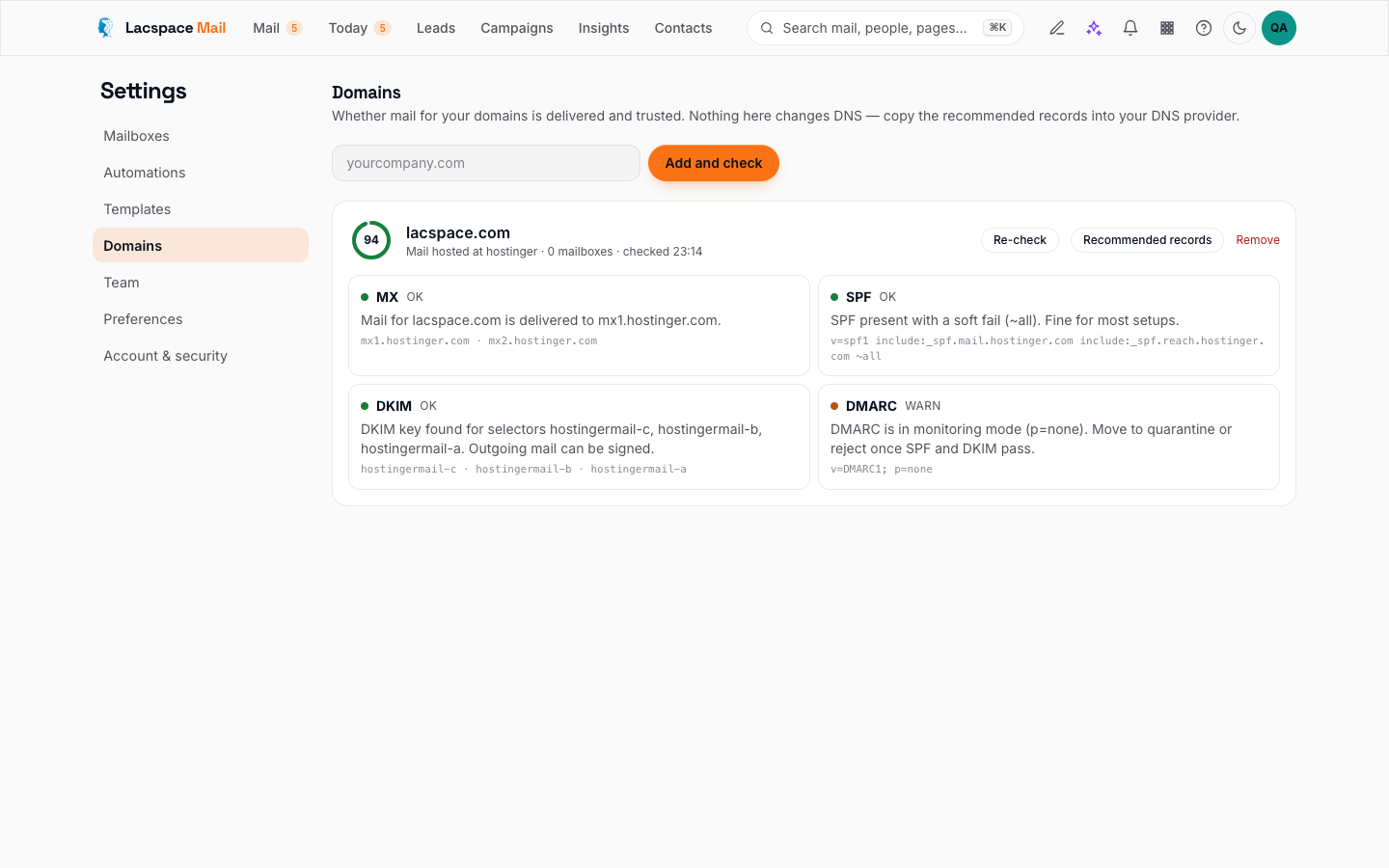
Lacspace Mail shows the exact records your domain needs under Settings → Domains, and checks them for you.
The other direction: trusting what arrives
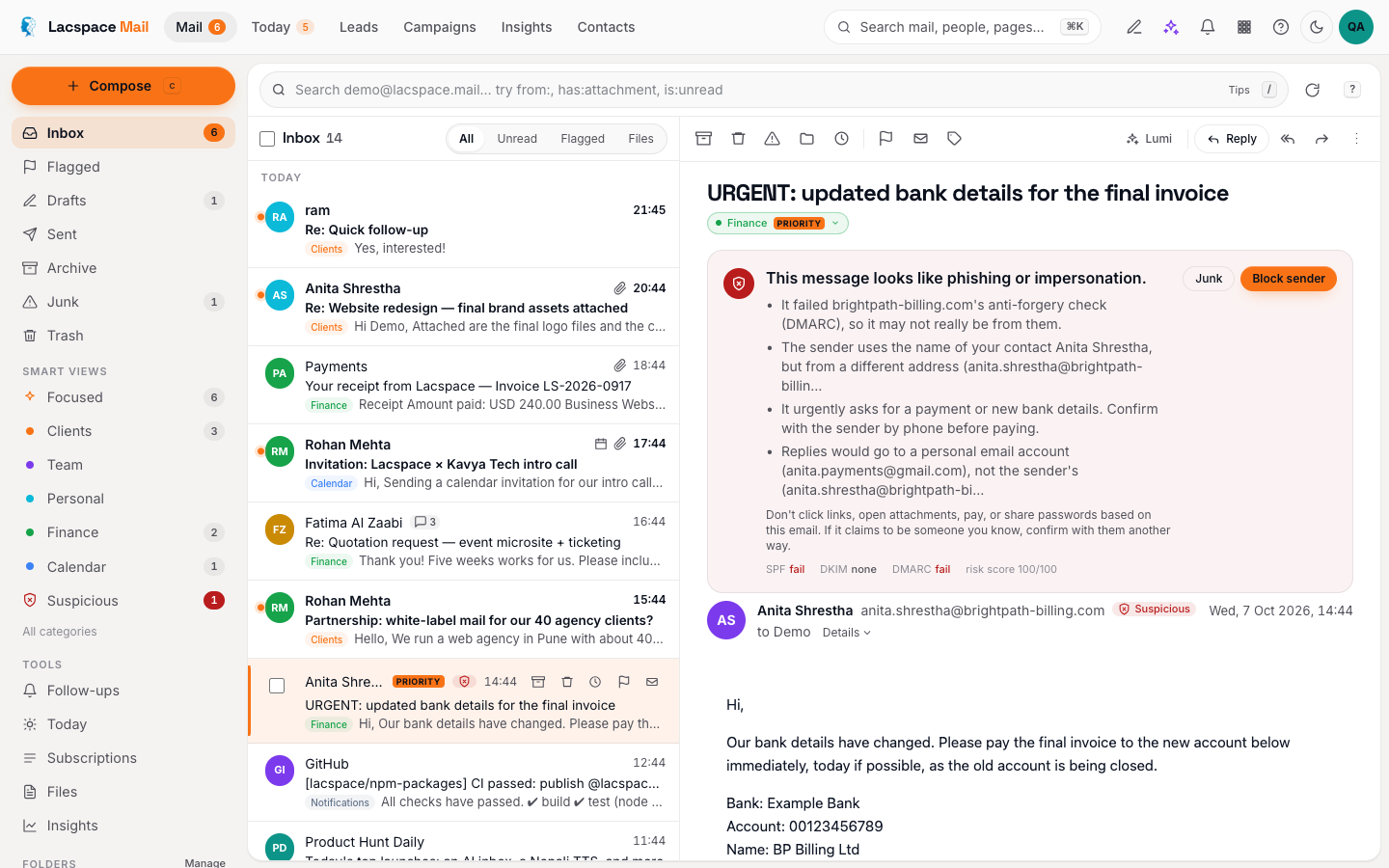
The same three verdicts tell you how much to trust incoming mail. Lacspace Mail reads the Authentication-Results your provider adds — and checks SPF and DKIM itself where they are missing — then shows the result on every message. On top of that it adds the checks authentication cannot do: a domain that looks like a known one but is not, a Reply-To that points somewhere else, a display name impersonating a colleague, urgent payment language, links whose text and destination disagree. Trip a check and the message gets a red banner that says why in one sentence, with remote images blocked.
Teach the team one rule: when the banner is red, call the person on a number you already have before paying anything.
Everything in this article is documented in the how it works page, including the honest limit: a perfectly authenticated phishing mail from a fresh domain still exists. That is what the heuristics are for.
See the verdicts on your mail → Read how it works
Frequently asked questions
Do I need all three?
Yes. SPF says which servers may send for your domain, DKIM proves a message was not altered, and DMARC tells receivers what to do when the first two fail. Gmail and Yahoo require all three from anyone sending in volume.
Will setting these up break my email?
Not if you start DMARC with p=none, which only reports. Add every service that sends for you (your mail provider, your newsletter tool, your invoicing software) to SPF first, enable DKIM at each, watch the reports, then move to quarantine and finally reject.
Does a “pass” mean a message is safe?
No. Authentication says who sent the mail, not whether they are honest. A phishing mail from a fresh look-alike domain can pass all three. That is why Lacspace Mail adds heuristics for look-alike domains, Reply-To tricks and payment language on top of the verdicts.
Where do I see the verdicts in Lacspace Mail?
Open any message: the authentication panel shows SPF, DKIM and DMARC results and the warnings. Search is:suspicious lists everything that tripped a check. Settings → Domains shows the records your own domain needs.